01
Real Device Characteristics
Keep browser, OS, hardware and network parameters aligned.
Isolated EnvironmentsMakoBrowser, a new-generation professional anti-detect browser
MakoBrowser is a professional anti-detect browser built for secure multi-account operations, with isolated profiles and consistent browser identities. Each profile maintains a relatively stable browser identity over time.
Stronger Isolation · Greater Consistency · Safer Operations · Higher Efficiency
Independent Environment
Independent Environment
Independent Environment
About MakoBrowser
MakoBrowser is a professional anti-detect browser built for secure multi-account operations, with isolated profiles and consistent browser identities.
An anti-detect browser gives each account its own browser profile. MakoBrowser manages fingerprints, cookies, local storage, proxies, language and timezone separately, reducing unnecessary links between accounts that would otherwise share device and browser signals.
Every account runs independently in its own browser environment, isolated from the others and free from interference.
Yes. MakoBrowser is a professional anti-detect browser, built for isolated profiles and secure multi-account management. An anti-detect browser gives each account its own browser profile. MakoBrowser manages fingerprints, cookies, local storage, proxies, language and timezone separately, reducing unnecessary links between accounts that would otherwise share device and browser signals.
Next-Generation Architecture
Instead of generating parameters at random, system, hardware, location, and network signals form one coordinated, reasonable whole.
Keep browser, OS, hardware and network parameters aligned.
Isolated EnvironmentsKeep identity parameters aligned
Consistent FingerprintsEach account has its own browser environment, isolated from the others.
Independent EnvironmentEach profile maintains a relatively stable browser identity over time.
Long-Term StabilityCore Capabilities
Built around browser environment isolation, fingerprint consistency, multi-account security, and operational efficiency, MakoBrowser anti-detect browser provides the core capabilities needed for stable long-term multi-account operations.
Each account has its own browser environment, isolated from the others.
Keep identity parameters aligned
Give each account its own proxy, region, timezone, and network environment.
Keep account environments separate
Run repeatable tasks together
Use RPA and APIs to connect repetitive browser workflows to existing business systems.
Comparison
Environment isolation and consistent identities give multi-account operations a clearer, more independent and stable foundation.
Comparison assumes multiple accounts within the same regular browser profile. Separate user profiles can isolate cookies and storage.
Environment isolation and consistent identities give multi-account operations a clearer, more independent and stable foundation.
Stable Fingerprints
A reliable browser fingerprint is not created by randomly changing parameters. System, browser, hardware, location, and network signals need to maintain reasonable relationships.
Consistent Browser Identity
Profile Isolation
Every account runs independently in its own browser environment, isolated from the others and free from interference.
Independent Environment
Independent Environment
Independent Environment
Each account has its own browser environment, isolated from the others.
How It Works
MakoBrowser connects stable browser identities, profile isolation and automation in one multi-account workflow.
Give each account its own profile
Keep identity parameters aligned
Reduce unnecessary account links
Keep account environments separate
Run repeatable tasks together
Spend less time on routine work
Efficiency Tools
Create, organize, configure, launch, and manage every browser environment so multi-account operations become clear instead of chaotic.
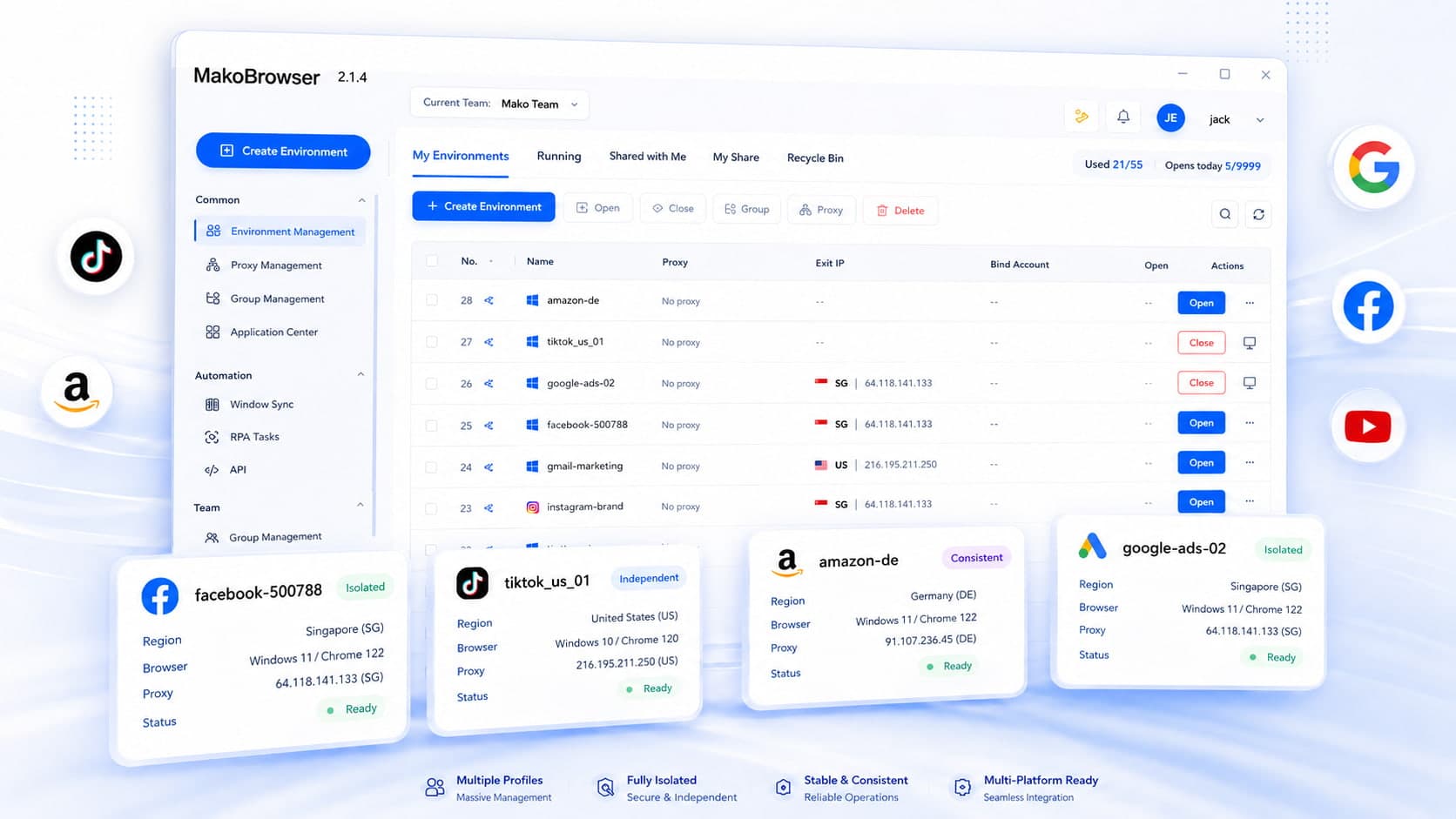
Use Cases
From social media, e-commerce, and advertising to affiliate marketing, Web3, and team collaboration, MakoBrowser provides clear, independent browser environments for different operations.
Why MakoBrowser
Each profile maintains a relatively stable browser identity over time.
Reduce unnecessary account links
Each profile maintains a relatively stable browser identity over time.
Keep identity parameters aligned
Run repeatable tasks together
Spend less time on routine work
MakoBrowser goes beyond editing fingerprints. It combines stable browser identities, isolated environments, account security and efficient operations in a new-generation professional anti-detect browser.
A Next-Generation Anti-Detect Browser
Stable Fingerprints · Isolated Profiles · Secure Multi-Account Management
Frequently Asked Questions
MakoBrowser is a professional anti-detect browser built for secure multi-account operations, with isolated profiles and consistent browser identities.
MakoBrowser is a professional anti-detect browser built for secure multi-account operations, with isolated profiles and consistent browser identities.
An anti-detect browser gives each account its own browser profile. MakoBrowser manages fingerprints, cookies, local storage, proxies, language and timezone separately, reducing unnecessary links between accounts that would otherwise share device and browser signals.
Yes. MakoBrowser is a professional anti-detect browser, built for isolated profiles and secure multi-account management.
Regular browsers also support user profiles and extensions. MakoBrowser brings profile isolation, fingerprint consistency and operational tools together in one workspace.
A reliable browser fingerprint is not created by randomly changing parameters. System, browser, hardware, location, and network signals need to maintain reasonable relationships.
When accounts have independent environments, coherent fingerprints, and separate network configurations, teams can reduce environment mixing and abnormal signals while building a more stable foundation for long-term operations.
An anti-detect browser gives each account its own browser profile. MakoBrowser manages fingerprints, cookies, local storage, proxies, language and timezone separately, reducing unnecessary links between accounts that would otherwise share device and browser signals.
Give each account its own proxy, region, timezone, and network environment.
Each profile maintains a relatively stable browser identity over time.
Why MakoBrowser
Start with your first independent Profile and make account environments clearer, operations more stable, and management more efficient.
Independent Environments · Consistent Fingerprints · Safer Operations · Efficient Management