Proxy Browser vs Fingerprint Browser: How They Work Together and How to Choose
Proxy Browser vs Fingerprint Browser: How They Work Together and How to Choose
When people shop for multi-account tools, one question keeps coming up: the labels are all over the place — proxy browser, fingerprint browser, anti-detect browser, stealth browser — are they all the same thing? And a more practical puzzle: some tools bundle a proxy store, some only handle fingerprints and leave IPs alone — is it enough to just pick one that "has it all"?
This article explains exactly how the two tool categories divide the work: what problem each one solves, why either one alone falls short, and how to choose between a built-in proxy store and bringing your own proxies. By the end, you'll see that the answer to "proxy browser or fingerprint browser" is usually not either-or.
First, Tell Them Apart: One Controls "Where You Connect From," the Other Controls "Who Is Connecting"
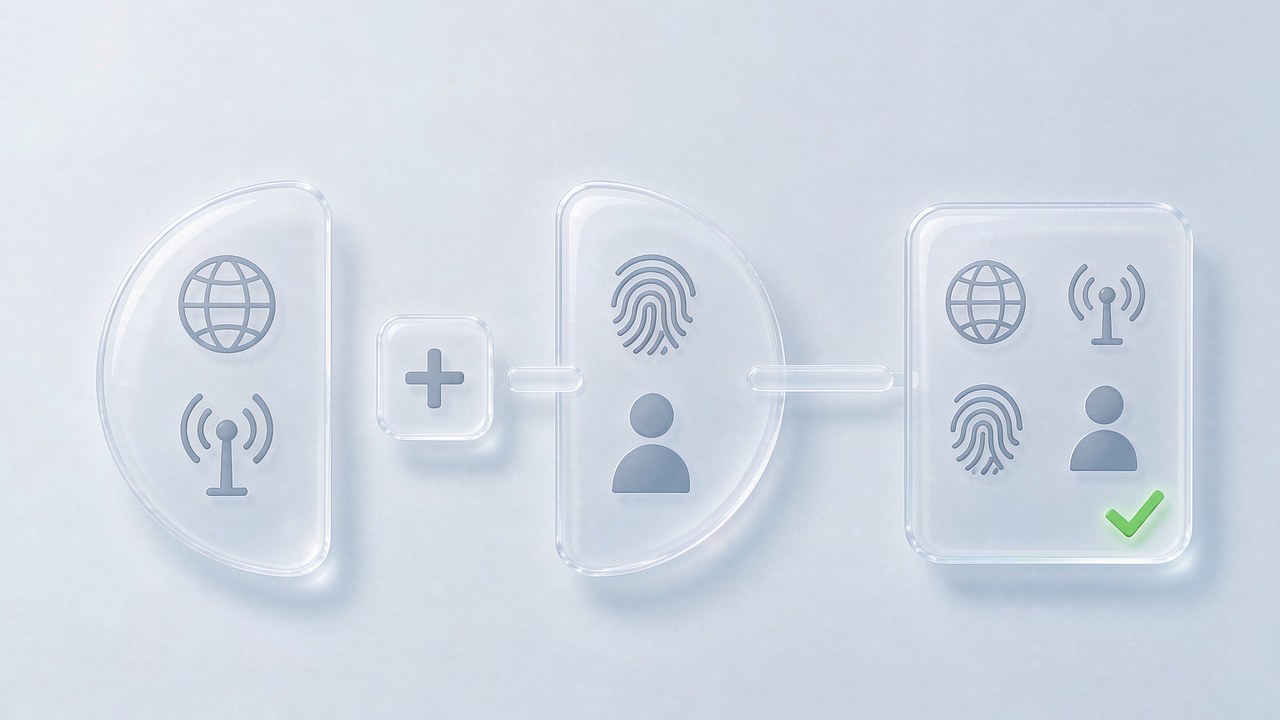
Platforms identify a user through two sets of signals. The first is your network identity: IP address, geolocation, carrier type — these signals answer "where did this request come from." The second is your device identity: browser fingerprint, system parameters, Canvas rendering output, local storage — these answer "what kind of device is this."
A proxy browser (and any browsing tool with built-in proxies) targets the first set: it swaps your exit point and location. But a proxy doesn't change the device itself — put ten proxies on the same computer and the browser fingerprint stays untouched; to the platform, it's still "one device wearing ten disguises." Conversely, a fingerprint browser (anti-detect browser) targets the second set: each environment gets an independent fingerprint and independent local storage, so every profile looks like a different device. But fingerprint browsers don't fix the network exit by default — an environment without a proxy still uses your real home IP, and ten "different devices" walking through the same door will get linked anyway.
So here's the conclusion up front: these two tools each manage half of one identity, and either half alone is incomplete. The real question isn't "which one to pick" but "how to make them work together."
Two Ways to Combine Them: Built-in Proxy Store vs Your Own Proxies
Once you understand the division of labor, the rest is an engineering question: where do the proxies come from? Products on the market follow two routes — take the "fingerprint browser + built-in proxy service" all-in-one products as an example:
Route one: built-in proxy store. The product integrates proxy purchasing directly — static proxies, datacenter IPs, static ISP, and traffic-billed rotating residential proxies; pick a country, order, and they're ready to use without leaving the app. The upside is convenience: no third-party sign-ups, no comparing parameter formats, and a beginner can run the full flow in ten minutes. Two things to watch: first, built-in proxy pricing isn't necessarily the best — compare the per-GB price against a few dedicated proxy vendors before deciding on volume; second, discounts come from somewhere, so read what bundled plans actually cover (vendor-promoted discounts are subject to the official site's live pages).
Route two: import your own proxies. You buy proxies from a specialized vendor and import them into the fingerprint browser manually — SOCKS5, HTTP, and HTTPS formats are generally supported. The upside is freedom of choice: negotiate volume pricing, pick route quality for your business, and keep your proxy assets in your own hands instead of being locked to the browser vendor. The cost is one more management task: maintaining, testing, and updating your proxy list yourself.
Neither route is absolutely better. For a small team just starting out with modest usage, a built-in store saves the most effort; at scale, when proxies become a core cost item, importing your own is more economical. Many mature products support both — buy from the built-in store and import third-party proxies side by side. A fair test of any product: does it force you to use its own proxies? That question alone works as a selection criterion.

Selection Checklist: Decide Your Combo by Business Scenario
When it comes to choosing, work through these five questions in order and the answer will surface:
- Does the business live in a browser or an app? For browser scenarios (ecommerce backends, web-based social media, ad platforms) a fingerprint browser is the main battleground; app-first businesses should look at cloud phone solutions instead.
- Is the fingerprint capability complete? Check four things: whether fingerprint parameters cover the major dimensions (Canvas/WebGL/fonts/hardware), whether the parameter combinations are realistic (not purely random), whether timezone and language auto-align with the IP, and whether local storage is physically isolated per environment.
- How do proxies connect? Confirm it supports the protocols you already have (SOCKS5/HTTP), with bulk import and a unified proxy pool; for light usage, starting with the built-in store is fine.
- Scale and collaboration. Bulk environment creation, template reuse, and group management are the efficiency dividing line; for team use, also check permission tiers and operation logs.
- A verification loop. After configuring an environment, can you easily verify IP, timezone, and fingerprint consistency? Without a verification loop, isolation quality is pure luck.
On the principles of multi-account anti-association, an earlier article, normal browser vs anti-detect browser, explains thoroughly why a normal browser can't do the job; for the network half, static vs rotating proxies breaks down the options by business scenario — read both alongside this piece and the full decision chain clicks into place.
On the fingerprint half, MakoBrowser's philosophy is to make the two halves working together the default experience: a unified proxy pool, free third-party proxy imports with no lock-in, each Profile's fingerprint parameters and timezone/language auto-aligned to its proxy, and the team plan rounding it out with bulk creation and permission assignment — you never have to stitch the halves together by hand.
FAQ
Can I just add proxies and skip the fingerprint browser? Fine for a single account switching regions temporarily; not fine for multiple accounts. A proxy only changes the exit — the same device fingerprint showing up on dozens of accounts is a worse association signal than IP. Fingerprints are identity; IP is just location.
Will built-in proxies "mismatch" the fingerprint? Reputable products auto-align timezone, language, and proxy geolocation when you create an environment — that's table stakes. If you bring your own proxies, watch this match yourself: after importing, open a detection page and check once.
I already bought third-party proxies — do I have to buy again if I switch tools? No. Mainstream fingerprint browsers all support third-party proxy imports; your proxy assets travel with your configuration and don't depend on the browser vendor — which is exactly why "no proxy lock-in" should be a top selection criterion.
Is one tool with both fingerprint and proxy always better? All-in-one saves management overhead, not quality. Fingerprint depth and proxy route quality are two independent dimensions — evaluate them separately: fingerprints by parameter coverage and realism, proxies by route quality and price. Don't be waved through by the words "has it all."
Proxy browsers and fingerprint browsers are less a contest than two roles on the same job: one manages location, the other manages identity. Staff both roles and keep them in sync, and your accounts stand; hire only one, and the gap will eventually turn into an incident.
Settling the combo by business scenario matters far more than agonizing over brands. Download MakoBrowser and manage the proxy half and the fingerprint half as one complete thing, in one workspace.