MakoBrowser vs Gologin: How to Choose an Anti-Detect Browser for Multiple Accounts
Most people searching for a Gologin alternative did not fail to use it — they used it long enough to notice that the bill no longer matches what they actually need. MakoBrowser and Gologin are both anti-detect browsers, both bill by profile count, and both do the same job — giving each account its own isolated browser environment. What separates them is product DNA and the shape of the price curve: Gologin arrived early and covers more form factors, while MakoBrowser is the newer entrant, built around consistent fingerprints and batch automation. This article picks no side; it lays out the real prices on both sides and gives you a selection logic you can walk through yourself.
Start with the basics: Gologin and MakoBrowser are the same kind of tool, just weighted differently
Both isolate fingerprints, cookies, local storage and proxy networks per profile, which reduces the incidental signals that link accounts together. So asking "which one is safer" is the wrong question — the safety boundary depends on how you configure things, how clean your proxies are and whether your activity looks human, not on which brand you bought.
The differences come down to three points:
- Product form: Gologin offers a desktop client, cloud launch and an Android app, so a profile can move between computer and phone; MakoBrowser currently has Windows and macOS desktop clients only, and profile data stays on your own machine by default.
- Product DNA: Gologin opened the market with an "as easy as Chrome" pitch — a Chromium core plus a clean interface, a low barrier for beginners; MakoBrowser starts from parameter consistency: instead of randomising fingerprints, it makes the whole signal set — system, hardware, timezone, language, network — tell a coherent story.
- Automation: Gologin takes the open route, offering a REST API and integration with frameworks such as Selenium and Puppeteer, but its built-in automation is not included — you wire up the code yourself. MakoBrowser builds RPA (template-driven browsing, liking, commenting, posting, scraping) and window sync into the client, so you can run it without writing a line of code.
How many accounts you run decides which price table to read
This is the part reviews like to skate over and the part that most shapes the decision. Both vendors tier by profile count, but the jumps between tiers are very different:
- Gologin (figures from the official pricing page): the Professional tier covers 10 / 25 / 50 / 100 profiles, $9 per month, or the equivalent of $4.50/month billed yearly; Business covers 300 / 500 profiles, $99 per month, or about $49.50/month billed yearly; Enterprise covers 1000 profiles, $179 per month, or about $89.50/month billed yearly; above that, Custom starts at 2000 profiles and is configured on request.
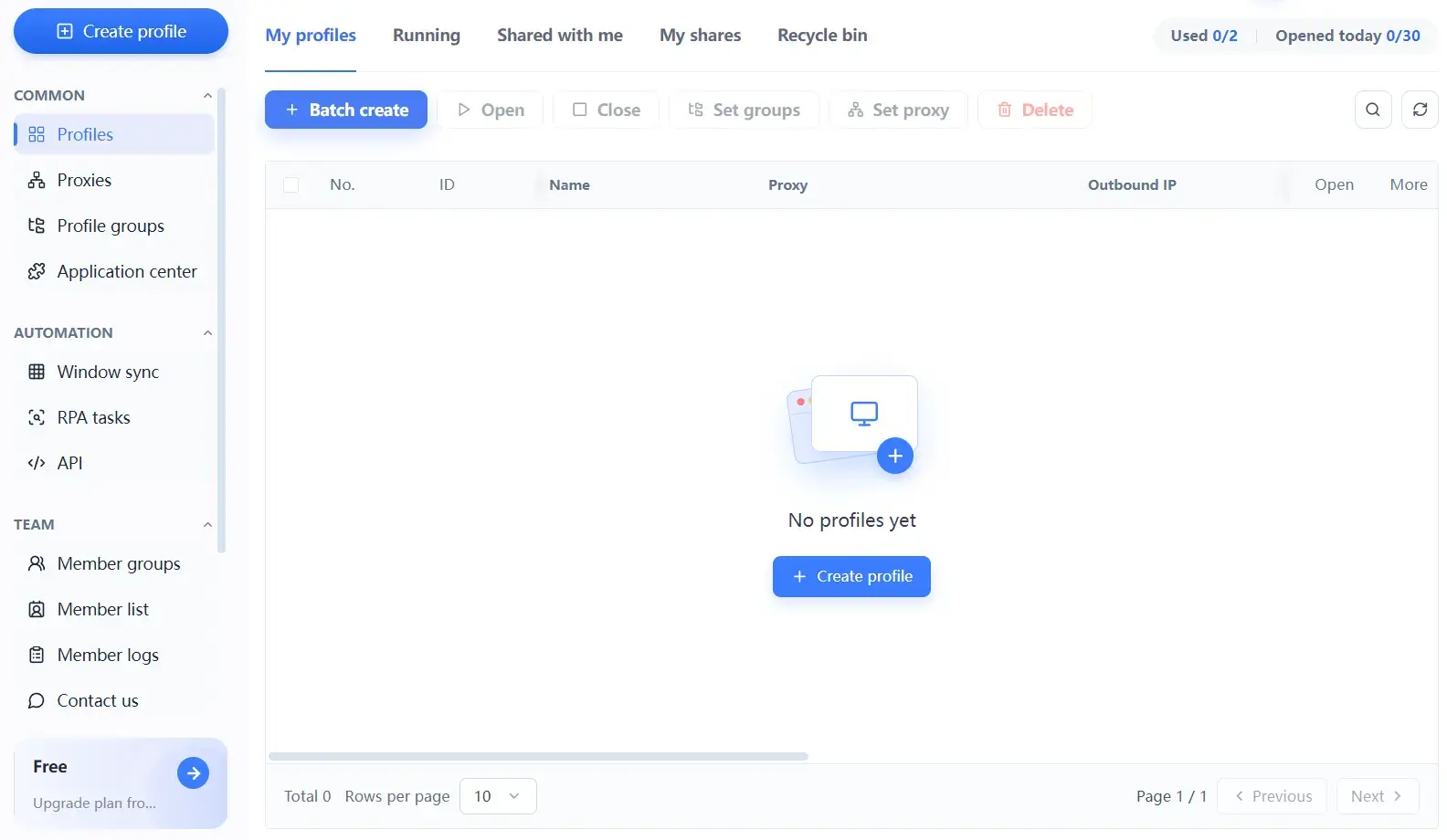
- MakoBrowser: the free plan includes 2 profiles and 2 members, free forever; the Pro plan starts at $6.80 per month, or the equivalent of $3.40/month billed yearly after the 50% discount; the Advanced plan starts at $27.50 per month, or about $13.75/month billed yearly. There are also quarterly billing at 30% off and a 15-day short-cycle option, so the cost of testing is low.
Convert to a single profile and the gap becomes clear: at 10 profiles, Gologin works out to about $0.45 per profile/month billed yearly, and at 300 profiles about $0.17; MakoBrowser's Pro plan is about $0.34 per profile/month at 10 profiles, and the Advanced plan about $0.14 at 100 profiles. More profiles means a lower unit price, but two other variables decide the bill: how many team members you add and your API quota — both vendors charge extra for them.
So there is no universal answer to "which one is cheaper", only three questions:
- How many profiles do you run at once? At a dozen or so you care whether the interface is pleasant; at several hundred you care about bulk operations, group management and stability.
- Are profiles kept long-term, or used and thrown away? For accounts you run for months, profile consistency matters more than the number of parameters.
- How many people on the team need to log in and work? Some products look cheap until you add two or three members and the price flips.
Proxies: paying yourself versus bringing your own are two different paths
Proxies are the most underrated long-term cost in this category.
Gologin is proxy and browser bundled together: plans include a certain amount of residential proxy traffic, and you can also attach your own proxy in the client with one click. The upside is that it works out of the box; the cost is that the included traffic usually only covers verification-style operations, and real production volume still means buying your own.
MakoBrowser is not tied to a proxy vendor: you configure a proxy per profile and decide the protocol and which residential provider to use. For teams that already have a proxy channel, that removes a duplicate line item; for newcomers with no proxy resources at all, it means solving sourcing first.
The call is not complicated: to get a workflow running end to end, a bundled plan is more convenient, and you start with the included traffic; if you already have a fixed proxy provider or a large proxy footprint, vendor-neutral is cheaper; and if your accounts are spread across countries, first confirm that each profile can be given its own region and timezone — that matters more than whether proxies are included.
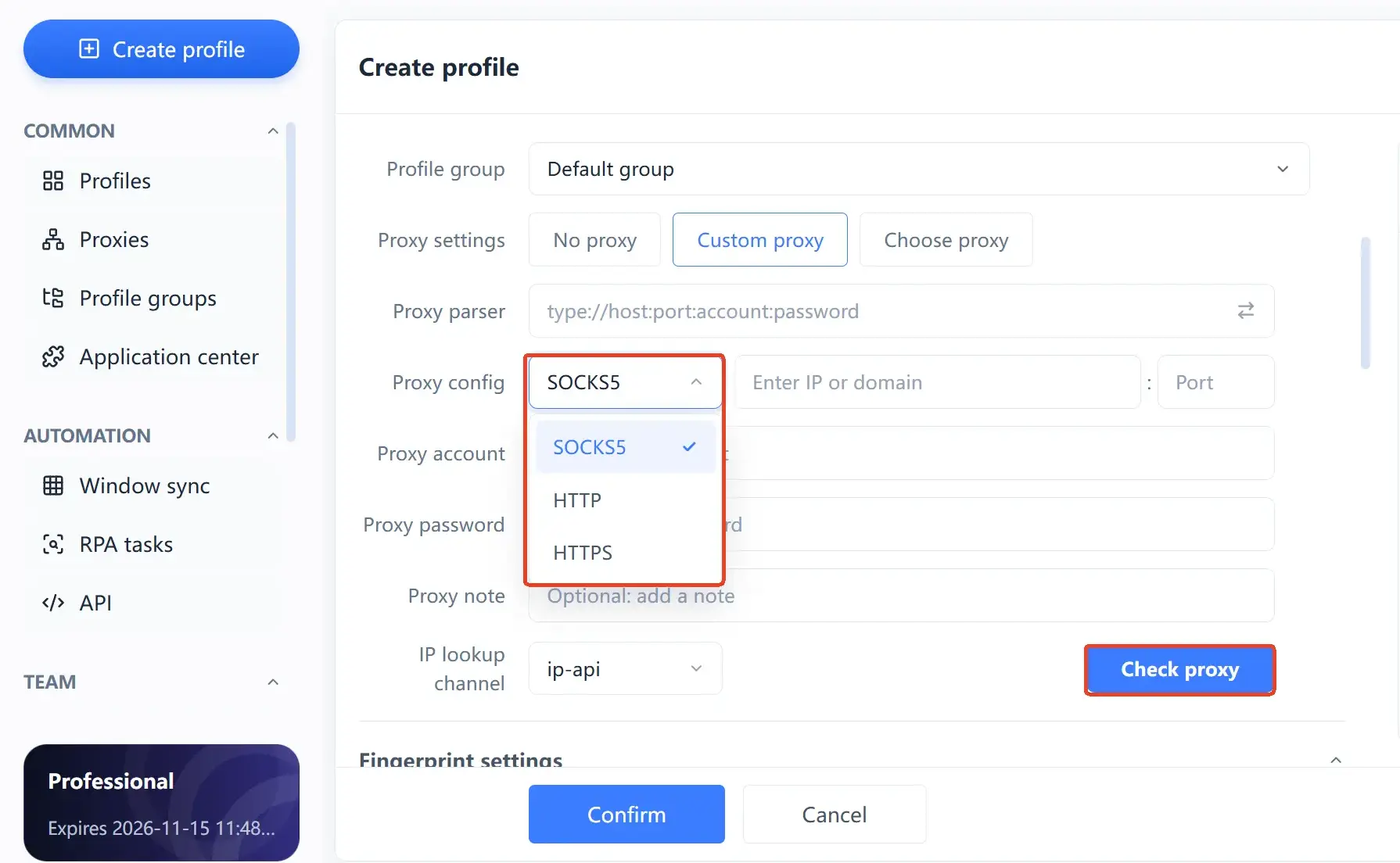
New to this? The difference between SOCKS5 and HTTP proxies explains how to reason about protocol choice. And remember: an anti-detect browser does not replace a proxy, and it does not change your exit IP.
Your automation needs will eliminate one of the two
Ask yourself one question first: does the repetitive work you have in mind require code?
Cases that need code: wiring account operations into an existing business system, running scraping scripts, connecting to an internal CRM or order system. Gologin's open API is sufficient, the Selenium and Puppeteer ecosystem is mature, and your team's existing stack can plug straight in.
Cases that do not need code: day-to-day maintenance of multiple accounts, browsing and engaging on a fixed rhythm, publishing content in bulk, scraping pages from a template. Without developer resources on hand, a code-based approach is hard to land; this is exactly where built-in RPA earns its keep — it turns "open these profiles and do these things in order" into a template you can run directly.
Window sync solves a different problem: with several profiles open at once, one action is mirrored to every window, which suits checking multiple store back ends in parallel. How it divides work with RPA is covered in more detail in window sync + RPA in practice; here the point is just this: work out which category your repetitive work falls into before you compare feature tables.

Four details worth more than a spec sheet
Feature lists all look alike; what really shapes daily experience are the things that rarely make it onto a marketing page:
- How extensions are managed. Products with a dedicated extension module can attach extensions to a batch of profiles and update them in bulk; without it, every profile is configured by hand.
- How specific the warning is when a proxy is wrong. A blank input box that stays silent when something is off multiplies your troubleshooting cost several times over.
- The pace of core updates. A lagging core means lagging security patches and website compatibility; the changelog tells you more than the version number.
- Whether profiles can be exported. Some products only import from one specific vendor, so switching tools means starting from zero. Ask before you sign: if we change plans in six months, can we take our data with us?
On top of that, both categories of product love to promise "no bans" and "undetectable". No vendor can actually deliver that promise — all a tool can do is manage profile signals well and reduce technical correlation; content compliance and activity rhythm are still on you.
When to choose Gologin, when to choose MakoBrowser
Gologin is the better fit when
- Your team has developer resources and account operations must connect to an existing system.
- You need mobile operation, or you want profiles that follow you between devices through cloud launch.
- You run accounts in the tens, care more about getting started fast and do not want to fiddle with configuration.
- You want proxies and the browser solved as a bundle and would rather not source a vendor yourself.
MakoBrowser is the better fit when
- Your profile count will keep growing, and bulk creation, bulk launch and group management are non-negotiable.
- You have no developer resources but still need repetitive operations automated, and want RPA and window sync ready to use.
- You already have a proxy channel and do not want to pay twice for bundled proxy traffic.
- Your budget is tighter when calculated per profile, and you want every tier's money to go into profiles.
If both lists apply partly, it is not yet time to switch. Get your account operation up to scale with the tool you already have, and wait until one category of need keeps biting you (say, half a day lost every week to configuring extensions by hand) — that is the moment to switch. MakoBrowser is built for long-term multi-account operation, and its capability boundaries are documented fairly clearly; read them against your own needs first.
Frequently asked questions
Is Gologin or MakoBrowser safer?
They do the same thing under the hood: isolate profiles, manage fingerprints, separate proxies. Safety does not come from the brand; it comes from whether the configuration is sound, whether the proxies are clean and whether the activity looks human. Any claim of guaranteed undetectability should not be trusted.
Does MakoBrowser support Selenium or Puppeteer?
It offers a Local API that automation flows can connect to, and it also builds in RPA and window sync, so most repetitive work can be done without writing code. If you already use those frameworks, you can prove the setup through the Local API first and then settle on the overall plan.
If we move from Gologin to MakoBrowser, can existing profiles be migrated?
That depends on how profile data is exported, and the two products support different migration scopes. Before deciding, confirm three things: what can be exported, in what format, and whether cookies and login state survive the import.
I only run about a dozen accounts. Do I need to switch?
Usually not. At that scale any mature product is enough, and the migration cost may outweigh the gain; your energy is better spent on proxy quality and activity rhythm.
Use profile management to run multi-account operations longer
What you are really comparing in the end is not feature count but whether your profiles can still be clean, stable and manageable months from now. At small scale the difference is invisible; once scale arrives, messy naming, unexplainable proxies and extensions each going their own way all surface at once. MakoBrowser puts isolated profiles, fingerprint consistency, proxy management and batch automation into one workspace, precisely so that order holds as the account count grows.
Download MakoBrowser and start with your first isolated profile.