How a 30-Day Account Warming System Turns the Warm-Up Pace into Daily Tasks
The hardest part of warming up a new account is the very first step — not because the actions are difficult, but because nobody tells you what to do each day or how much is enough. MakoBrowser has shipped an account warming system that takes this over: once an account is bound to an environment, it splits 30 days into daily tasks, tells you what to do today and what to skip, and which step to pause on when something goes wrong. It currently supports Facebook and Gmail accounts, with other platforms to follow.
What the warming system is: turning "no idea what to do today" into a task list
- It manages the pace: each day it suggests tasks and an estimated time; you work through them on your own schedule and tick them off.
- It manages behavioral boundaries: beyond what to do, it spells out what not to do today, so beginners don't make the moves most likely to draw attention in the first few days.
- It doesn't change platform rules: it doesn't promise an account will never be challenged, and it doesn't handle content or ad compliance. It simply locks in a generic warming rhythm to reduce misjudgments caused by clumsy actions.
Why is it needed? Warming advice in the community is a mess — one person says leave the account for a week, another says three days is enough. The real problem isn't how long you wait but the absence of standard actions. A new account has a blank profile and no interaction history, so it is already under observation; any aggressive move on top of that just stacks on more risk.
Who is it for? Anyone holding more than one account. Agencies managing accounts for clients, teams splitting operations, and multi-brand or multi-store setups all run into the same wall: too many accounts, no way to keep the pace straight. This runs inside a fingerprint browser environment, where one account per environment is the baseline.
Thirty days split into five phases, each with a different schedule
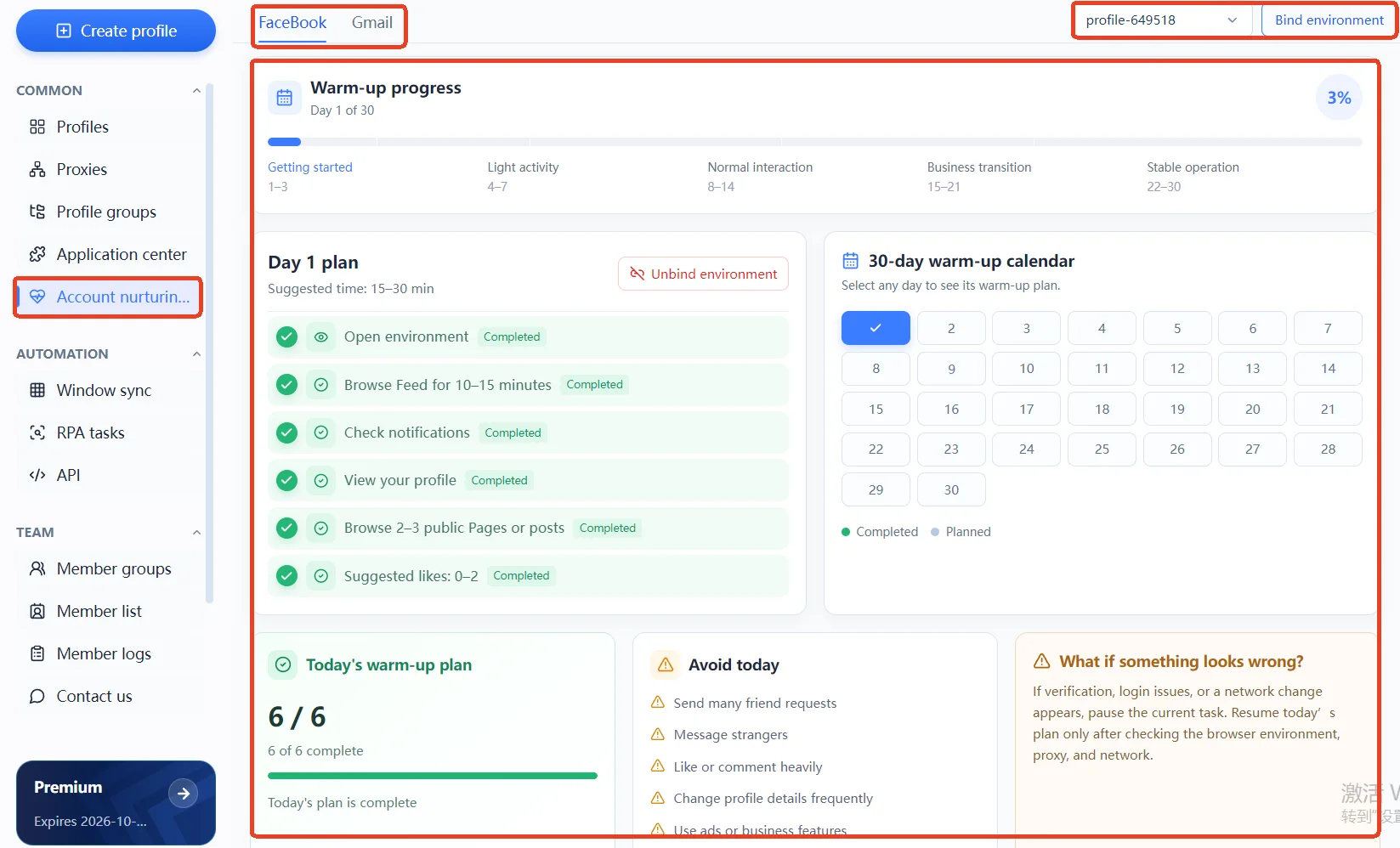
The system divides the warming cycle into five stages, each with its own goal:
- Onboarding (days 1-3): use the account like someone who just signed up — browse and fill in profile details only, no social actions.
- Observation (days 4-7): start a small amount of genuine interaction; low frequency and real actions are the point.
- Normal interaction (days 8-14): gradually raise interaction and posting frequency so the account starts to look like a regular user.
- Business transition (days 15-21): you can start easing in business-related content, but don't go straight to running ads.
- Stable operation (days 22-30): once the rhythm is steady, consider ads, Pages, and other commercial uses.
At the top of the page is the phase progress; on the right is the 30-day warming calendar — click any day to see that day's plan, where green means completed and grey means on track as scheduled. Two numbers below get the most attention: the warming progress is the completion rate across the whole cycle, and today's warming plan is the share finished today. What it settles is which day to ease off and which day you can push, so you don't have to guess.
Open it on day 1 and you'll find a task list plus a "don't do today" list
Take a Facebook account as an example. The system suggests 15-30 minutes, and the day's tasks are:
- Open the environment
- Browse the feed for 10-15 minutes
- Check notifications
- View your profile page
- Browse 2-3 public Pages or posts
- Like 0-2 times, as a suggestion
Tap any task to mark it done and the progress updates live. The key word is "suggestion": 0-2 likes means browsing is enough — it isn't asking you to hit two likes before you leave.
The same screen also shows a "don't do today" list, covering the pitfalls that trip people up most in the first few days:
- Sending a large number of friend requests
- Messaging strangers
- Liking or commenting in rapid succession
- Editing profile details repeatedly
- Running ads or business operations
These aren't rules the product invented. In its account integrity policy, Meta names bulk, coordinated, and restriction-evading behavior as direct enforcement targets; bulk, mechanical, or sudden actions trigger verification far more easily than whether your environment is clean.
When verification, a login error, or a network change appears, pause first and check
The most common mistake during warming is to retry over and over, swap nodes, or switch environments the moment verification appears.
The order the system gives is: pause the day's tasks, confirm the browser environment, proxy, and network are working, then continue today's plan once things are back to normal. The reason is simple — verification is usually the result of an environment or network fluctuation, and hammering retry or switching nodes in that moment only turns a one-off blip into a logged anomaly.
Before warming starts, the system also checks whether the selected proxy is reachable; when the proxy is down, the tasks shouldn't begin.
How to start the warming system: bind the account to an environment first
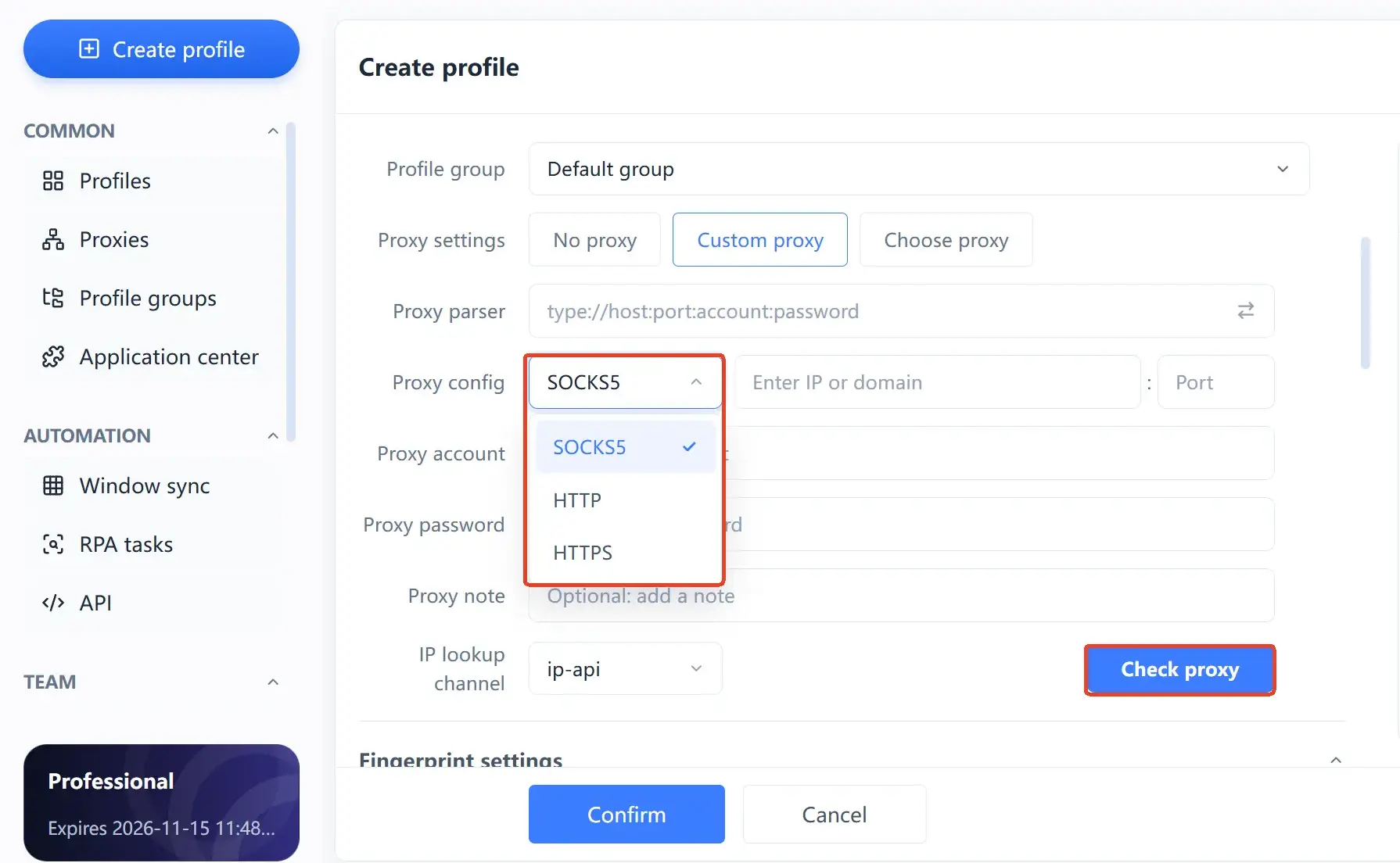
The warming system won't take over an account out of nowhere — it requires the account to be bound to an environment. When you create an environment, click "Add account" and fill in three things:
- Account type: currently Facebook or Gmail, which decides which task set applies.
- Account name: used to tell environments apart in the list.
- Account password: for later logins; you can also enter the name only to set up the structure first.
Add the cookies and proxy, confirm and save, and that environment will run the matching warming plan for the bound account. The guidance logic is the same on both platforms, but the task content is split by platform: on Facebook it leans toward interaction — browsing the feed, checking notifications, visiting public Pages, a few likes; on Gmail it leans toward genuine usage, so sending, receiving, and organizing all count, not just logging in and sitting still.
On account ownership, Google warns in its help documentation that sharing one account among several people can trigger security verification and even a temporary lock. In a multi-account setting, that translates to: one account, one independent environment — don't have several people taking turns signing into the same account.
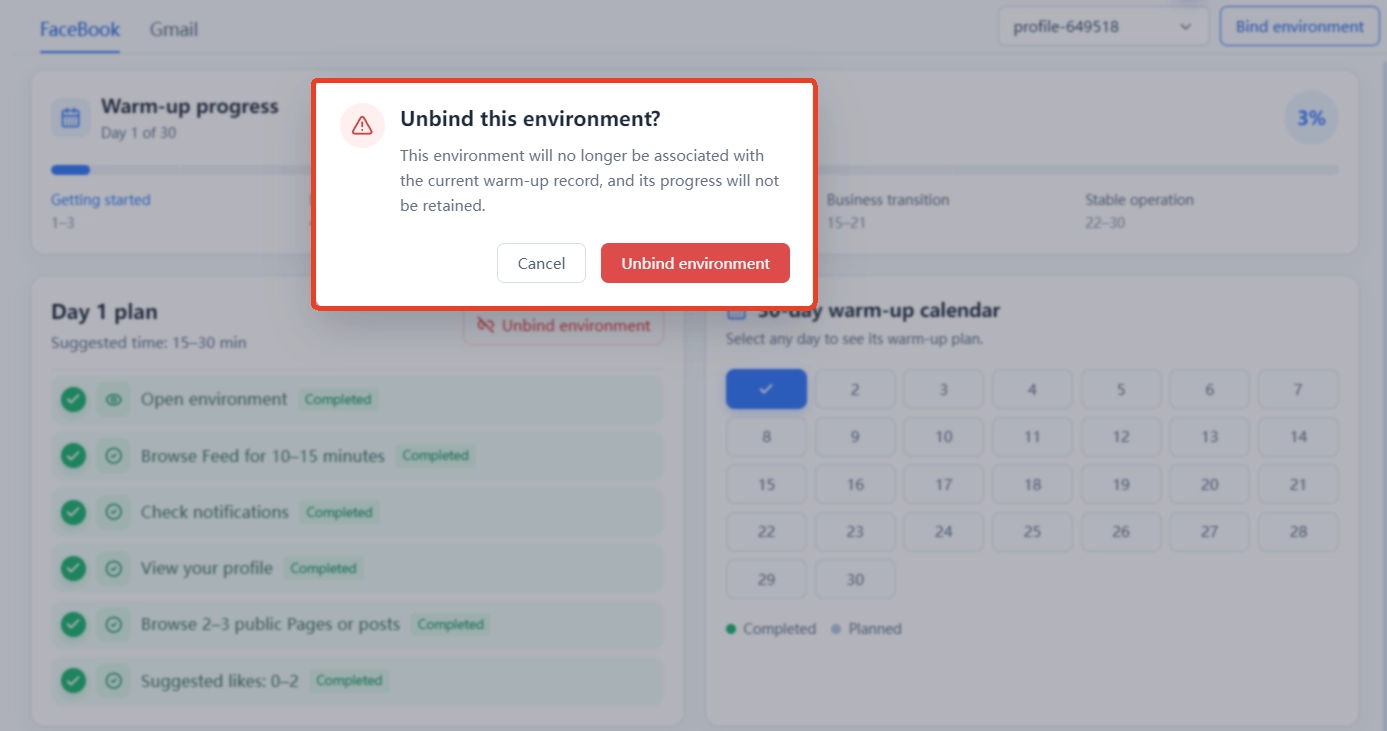
There's one more setting that's easy to overlook: unbinding. Once an environment is unbound from an account, it no longer runs warming for that account and the progress stops syncing. Swapping accounts temporarily or sharing one environment among several people both disrupt a rhythm that has already built up.
If you have several new accounts to warm at once, start by looking at how MakoBrowser manages environments, accounts, and proxies together; to run the full 30-day flow first, install the client from the download page and you're ready to go.
Frequently asked questions
Does warming always have to last a full 30 days?
It depends on the use. For everyday use only, the rhythm of the first two weeks is usually enough; to attach a Page or run ad accounts, go through the whole cycle and hold off on commercial actions until after the business transition phase. The system offers a pace reference, not a hard threshold.
Which accounts are supported right now?
At the time of writing, Facebook and Gmail, with both task sets generated day by day by the system. Guidance plans for other platforms are still in the pipeline; check the account type list in the client for the latest.
Will the warming system operate accounts for me automatically?
Not fully automatically. It tells you what to do today and how long to spend; browsing, liking, and posting are still up to you, ticked off when done. Treat it as a plan with a progress bar, not a background script.
Can I run ads or do business operations while warming?
Not advisable. Business operations belong after the business transition phase, and you should especially leave ads and DM outreach alone in the first two weeks. Platforms are already sensitive to the combination of a new account plus marketing actions.
Does warming progress survive after I unbind the environment?
No. Once unbound, that environment no longer runs warming for the original account and the progress stops syncing; rebinding amounts to starting over. So set the account-to-environment mapping correctly from the start.