Digital Marketing in 2026: A Practical Guide to Meta Ads Multi-Account Matrix Management and Anti-Linking
Digital Marketing in 2026: A Practical Guide to Meta Ads Multi-Account Matrix Management and Anti-Linking
If you have recently been running cross-border ecommerce, building a DTC brand, or managing Meta ads for clients, you have probably run into the same question again and again: one ad account has clearly stalled — do you keep adding budget and gamble, or split the budget across several accounts in a matrix? "Multi-account" is one of the most discussed terms in digital marketing teams these years, but far fewer people actually build one properly.
This article will not repeat the basic buttons inside the Meta ads dashboard. Instead, it focuses on the "multi-account matrix" itself: why does a single account stall? How do you group accounts so Meta does not wipe them all out at once? What role does a fingerprint browser actually play in this playbook? Finally, it gives you a practical checklist you can follow, plus a list of common questions.
Before you start, one judgment matters more than any tactic: which type of digital marketing campaign are you running right now? Growth stage, stable profit stage, or cold start — each determines how much you actually depend on multiple accounts. If you are not yet familiar with the ecosystem, first read this review of the 10 most popular anti-detect browsers in 2026, get the tooling layer sorted out, then come back — everything below will make far more sense.
In Digital Marketing, Meta Ads Remain the Main Battlefield: Why a Single Account Stalls
Let's start with a fact many new media buyers refuse to admit: Meta stopped being a "one account rules them all" platform a long time ago.
The Meta family (Facebook, Instagram, Messenger, Audience Network, Threads) has more than 3 billion monthly active users. From a digital marketing perspective, it is the only channel that models audience "behavioral trails" this finely: whether a person is interested in fitness, in protein diets, which ad categories they clicked in the past 30 days — audience data at this granularity is almost impossible to get anywhere outside the Meta ecosystem.
But that same granularity makes Meta's risk control more sensitive than any other channel. Run two ad accounts on the same device, the same network, and the same set of cookie fingerprints, and the system will most likely classify them as the same entity. The symptoms look like this:
- One account gets banned for a policy violation, and within hours the spend on another account falls off a cliff;
- A new account starts performing slightly well and immediately enters "review" status, with CPM noticeably higher than the older accounts;
- You think it's "a creative problem," but the system has actually decided that this "person" is the problem.
This logic holds because Meta puts identity detection (who is operating) ahead of delivery capability. First it decides whether you are a legitimate operator, then whether your ads get delivered. So a stalled single account is often not a creativity problem — your "digital identity" has already triggered linkage detection.
A Multi-Account Matrix Is Not "Opening a Few Accounts": First Decide How to Group Them
Many buyers' first encounter with the "multi-account matrix" goes like this: open a few more ad accounts inside Facebook Business Manager. That setup rarely survives a month.
Meta's linkage judgment looks at at least four dimensions:
- Device fingerprint: browser version, operating system, installed fonts, Canvas rendering output, and more;
- Network fingerprint: IP ranges, IP geolocation, network exit type;
- Behavioral fingerprint: mouse trajectories, click rhythm, page dwell time distribution;
- Asset linkage: bound credit cards, BMs, domains, payment accounts.
None of these four dimensions alone will get an account banned directly; but once any two of them are correlated, the survival rate of your accounts drops off a cliff. The real difficulty of a "multi-account matrix" is making every account look, across all four dimensions, like an independent real operator at work — not the same fingerprint with a new shell.
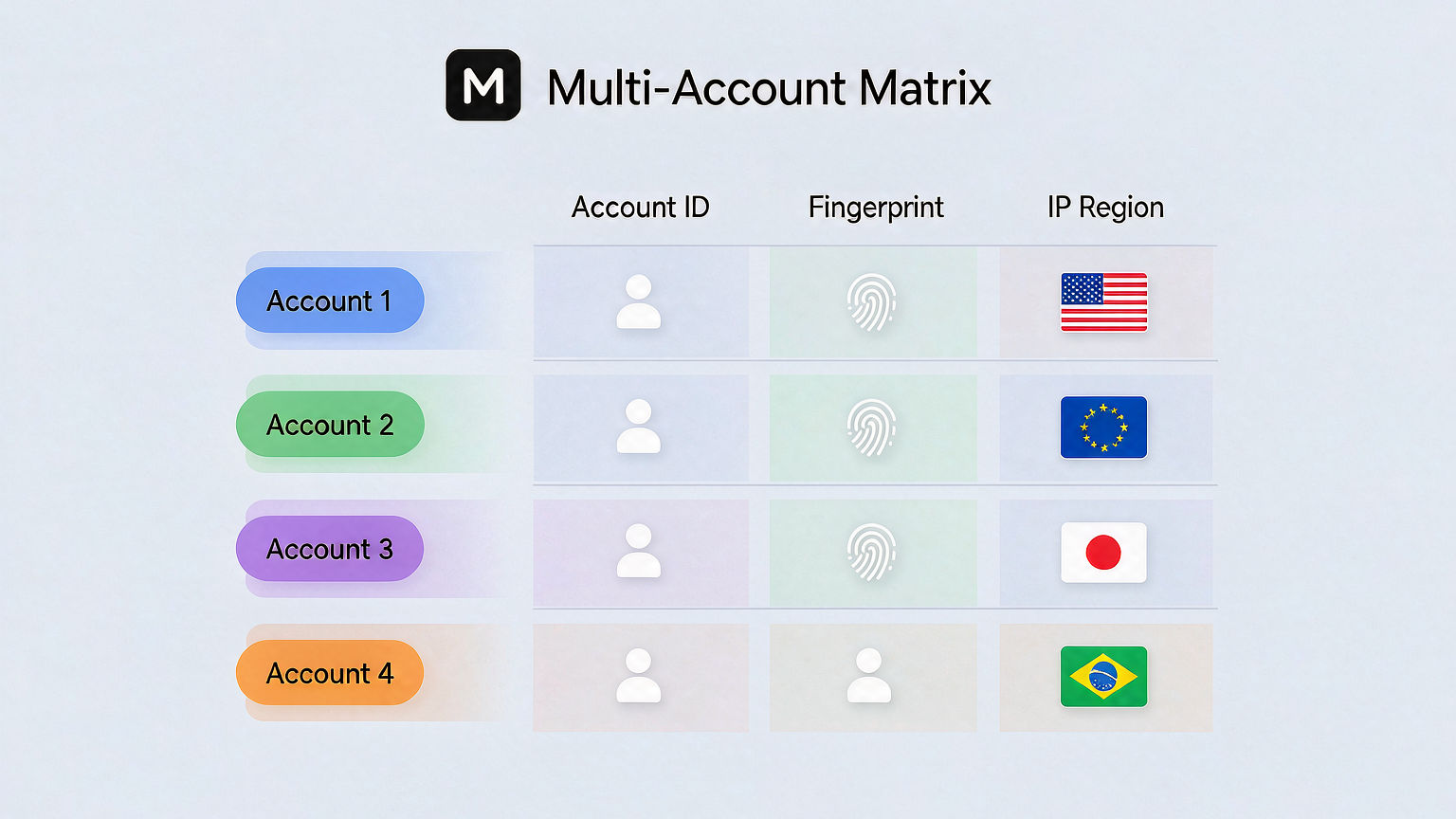
The grouping logic of a matrix follows roughly three approaches, depending on your business goal:
- Group by brand: one BM per DTC brand, with 3-5 ad accounts under each BM. This structure suits multi-brand portfolios — accounts naturally stay out of each other's way;
- Group by audience: within the same brand and separate assets, split accounts by audience segment (one for acquisition, one for retention, one for brand-keyword audiences). Suits scaling a single brand;
- Group by creative: bind each ad account to a different creative type (one for video, one for carousel, one for UGC). Suits the creative testing phase, where "creatives under test" and "validated creatives" need to run separately.
Which one to choose depends on which stage of digital marketing you are in. These three groupings are not mutually exclusive; the common pattern is "primary grouping + sub-grouping" — for example, group by brand first, then sub-group by audience inside each brand.
Anti-Linking Is Not Just About Changing IP: Fingerprint, Environment, and Rhythm Matter Just as Much
Reducing "anti-linking" to "changing IP" is the most common illusion in multi-account operations. IP is only one of the four dimensions; ignore the other three and your matrix probably won't survive three weeks.
Operators who keep multi-account setups stable almost always do two things at the tooling layer:
- Put each account in an independent browser environment: the goal is not just "changing fingerprints," but making Meta see a genuine device from a real usage scenario in a specific region. Note that isolation must be thorough — timezone, language, and Canvas rendering output all have to match the region of the IP;
- Stagger the operating rhythm of different accounts: never let N accounts log in at the same moment or change budgets at the same moment. Meta's behavioral model is extremely sensitive to "cluster behavior," and staggered timing is itself an invisible moat.
On tooling, there are basically two mainstream routes:
- Self-built setup: virtual machines + residential proxies + custom Canvas plugins. High customizability, but expensive to build and even more expensive to maintain — you need an engineer who understands browser kernels;
- Fingerprint browser setup: use a mature fingerprint browser to wrap each account into an independent browser Profile, with each Profile bound to its own proxy exit. Out-of-the-box, low maintenance; the only cost is time spent on tool selection.
If you are operating more than 5 accounts, the second route almost always delivers better ROI. At this layer, MakoBrowser has made "each Profile bound to an independent proxy + one-click Meta ad account environment" a core product capability, and the team edition supports staggered budget operations across accounts. After the matrix runs for a while, you will clearly notice that the cold-start CPM of new accounts is considerably lower than going in bare.
Here is what a real operations setup looks like:

As you can see, each Profile opens its own Meta ads dashboard, hangs on its own network node, and runs creatives for different audience segments — that is what a "matrix" looks like visually. Less is slow, fast is stable — once you manage more than 5 Meta ad accounts at once, the tool's isolation capability directly determines how long the matrix survives.
Building a Multi-Account Matrix From 0 to 1: An Actionable Checklist
Turning the judgments above into operations, here is a checklist you can follow directly.
Step 1: Decide the grouping strategy. Based on the previous section, pick one primary grouping (brand / audience / creative). Do not start with a "combination punch." The complexity of the grouping strategy should scale with team size — with only 1-2 operators, grouping by audience is the most direct choice.
Step 2: Prepare the environments. This step determines whether everything downstream can run stably:
- One independent browser Profile per ad account;
- One independent proxy exit per Profile, with IP ranges spread across different C-segments as much as possible;
- Each Profile's system timezone, language, and Canvas rendering output consistent with the IP's region;
- No sharing of cookies, local storage, or Flash cache between Profiles.
Step 3: Cold start in batches. Do not launch 5 accounts at once. Start with 1-2, and only after they run stably (spend curve enters its second phase, CTR, CR, and CPM all steady) open the third. Keep a 3-7 day gap between activating each new account and the previous one.
Step 4: Stagger operations. Spread logins, budget changes, and bid adjustments across different time windows each day. Meta's behavioral model is highly sensitive to "concentrated operations in the same window" — staggering itself is a moat.
Step 5: Monitor and roll back. Configure at least two monitors per account: one for spend anomalies (automatic alert if daily spend drops more than 30%), one for review status (instant notification when an account enters review). When an alert fires, pause that account for 24-48 hours and observe.
Among these five steps, the most commonly skipped are the first and the third — building environments before the grouping strategy is clear, then switching everything on at once, and getting wiped out by Meta in one sweep.
Digital Marketing Tool Selection: When Is a Multi-Account Setup Worth It (FAQ)
Q1: My single account runs fine. Why build a multi-account matrix?
Two scenarios. First, the account's daily spend has hit its ceiling (usually $5,000-$10,000/day), and extra budget has diminishing returns; second, cold-starting new accounts keeps getting harder and the single account can no longer scale. The multi-account matrix is the standard answer to both — provided you have independent operational capability for every account.
Q2: Is a fingerprint browser just an "account-swapping tool"? What is its real value?
No. A fingerprint browser's core value is putting "each Meta ad account" into an independent browser environment, so that Meta sees "a normal device, from a specific region, genuinely in use," which prevents accounts from being linked. You can build this yourself, but it is costly to set up and maintain. A fingerprint browser suits teams running 5+ accounts.
Q3: Does a multi-account setup suit every brand in digital marketing?
No. Early-stage brands and single-product DTC stores should not start with a multi-account matrix — getting a single account to positive ROAS matters more than any trick. The multi-account matrix is a scaling tool, not a cold-start tool.
Q4: Will a fingerprint browser be detected by Meta?
Mature fingerprint browser vendors (including MakoBrowser) have been sparring with Meta's detection systems for years, and the latest generation can simulate high-level fingerprints such as Canvas, WebGL, and AudioContext indistinguishably from real devices. What actually gets detected are sloppy configurations (timezone not matching the IP, overly generic Canvas rendering, behavioral rhythm too regular).
Q5: Once the multi-account matrix runs stably, where should digital marketing go next?
Two directions. Horizontal: expand from Meta to Google Ads and TikTok Ads to build a cross-platform matrix and reduce single-channel policy risk. Vertical: turn the multi-account matrix into team SOPs, converting "an operator's skill" into "the team's capability." The former is a scale problem; the latter is an organizational one.
A few years into digital marketing, one lesson stands out: tools set the floor, insight sets the ceiling. With multi-account matrices, the hard part is not opening accounts — it is operating each account as an independent "business entity." A fingerprint browser like MakoBrowser solves "putting each account into its own environment," but whether the matrix runs stably ultimately depends on your understanding of grouping strategy, cold-start rhythm, and staggered operations.
If you are building a multi-account matrix for Meta ads, the MakoBrowser team edition turns multi-Profile isolation, bulk proxy binding, and staggered operations into out-of-the-box capabilities — ready to try right away.