How to Keep Multiple E-Commerce Stores From Being Linked: Signals and Isolation That Works
Running multiple stores is a normal way to scale an e-commerce business; the real risk has never been "too many stores" but several stores that look like the same person in the platform's eyes. Multi-store anti-linking comes down to three things: one independent environment per store (fingerprint, cookies, login state), one independent residential proxy, and business data that never overlaps between accounts. Get those three layers clean and the platform has no signals to chain your stores with. Using MakoBrowser anti-detect browser as the reference tool, this guide breaks down how e-commerce platforms judge linking, and gives an isolation setup you can follow step by step.
How platforms decide "these stores share one owner"
Platforms judge store linking by overlapping signals across several categories, not by a single anomaly. Every time a store account logs in, the platform reads at least three things:
- Browser fingerprint: the combination of Canvas, WebGL, fonts, resolution, time zone and other parameters. Two stores logged in from the same computer receive exactly the same device identity.
- Network exit: where the IP is registered, residential or datacenter, and how many accounts ride on the same IP. Datacenter IPs and public proxy pools are a risk premium by themselves.
- Login and behavior patterns: whether login times match a human routine, whether one day spans several countries, whether the operating rhythm looks scripted.
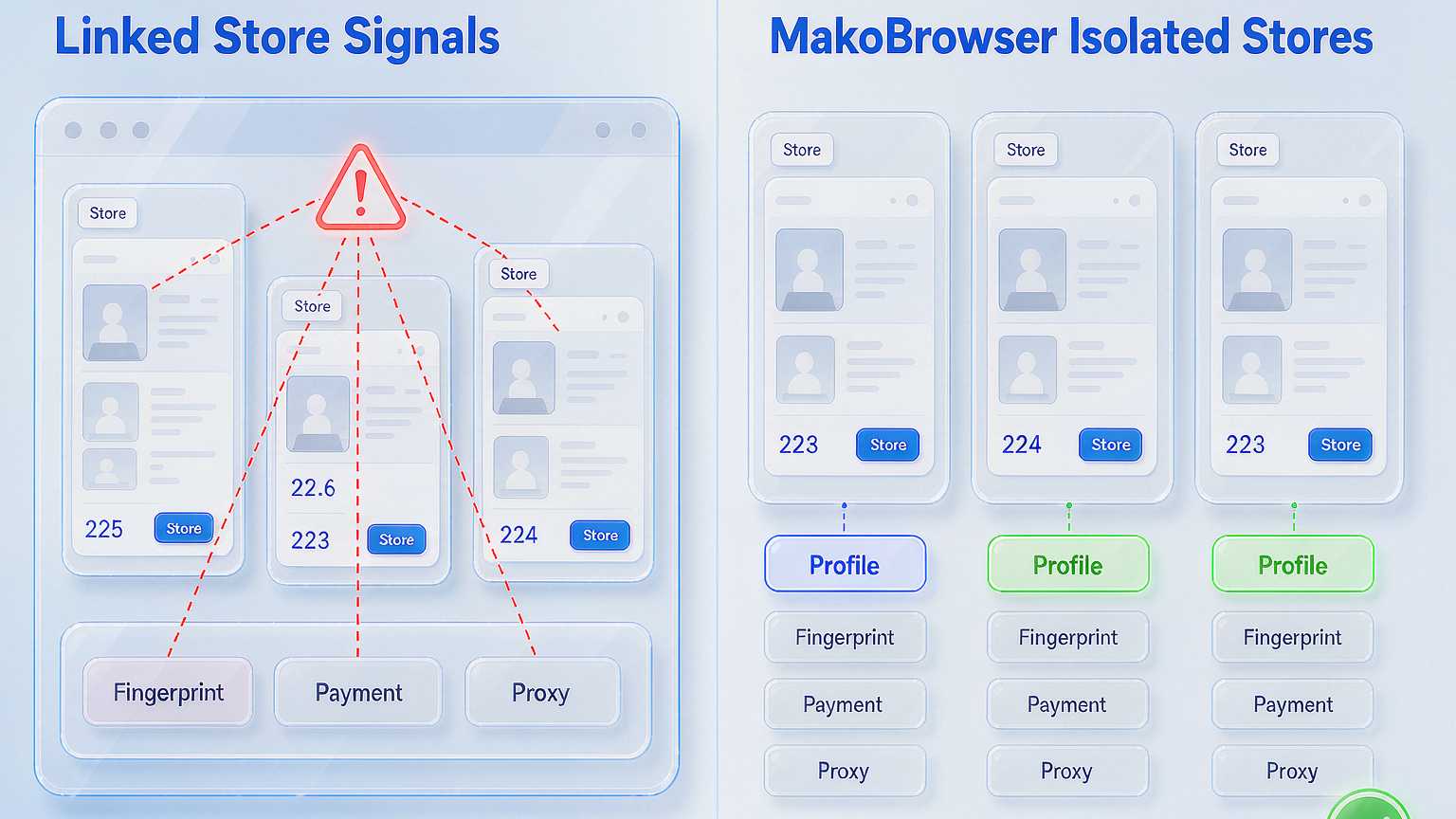
One layer down, the business-data overlaps are even more damning: the same shipping name and address, the same payout card, the same phone number or email, product titles and listing copy that read near-identical — evidence far harder to explain away than fingerprints. Each item alone has an excuse; stacked together they form a complete chain. This is also why changing the IP alone never works: you swap out one signal category and the rest stay exposed exactly where they were.
Two layers of isolation: environment and network
The fundamentals of anti-linking are isolating the environment layer and the network layer separately, because the two layers answer to two signal categories.
The environment layer covers fingerprint and login state: an ordinary browser cannot give every store its own identity, so you need an anti-detect browser to build an independent profile per store — its own fingerprint parameters, its own cookie storage, its own login sessions, never shared. The network layer covers the exit IP: bind one independent residential proxy to each store so its traffic looks like it comes from a different city, a different household. With both layers in place, every store is genuinely "one device plus one network".
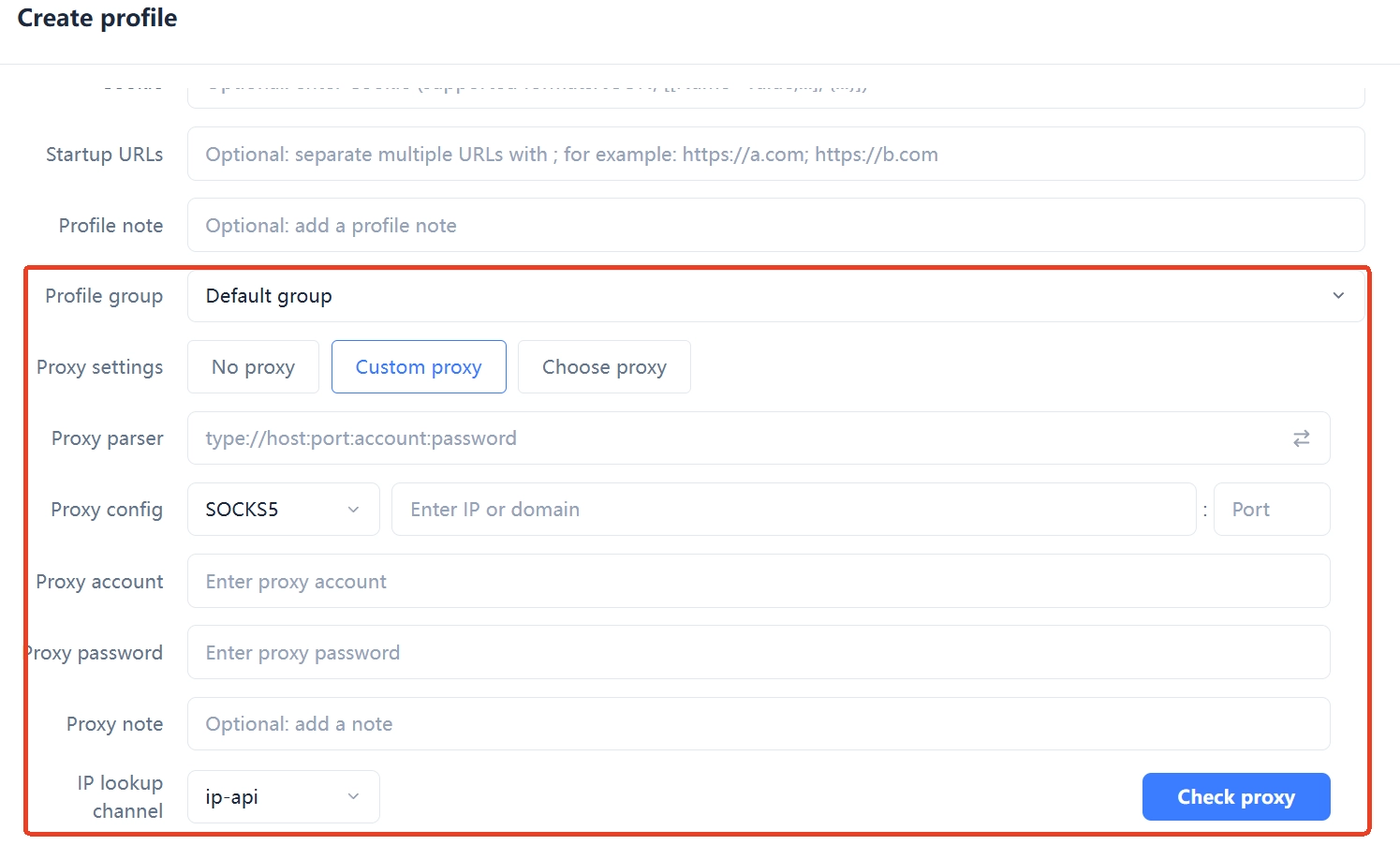
For proxies, prefer residential or static residential, and align the proxy region with the store's registration data and target market — a US store on a US IP; saving money with datacenter IPs is not worth it. HTTP, HTTPS or SOCKS5 depends on what your proxy provider supports; the parameter that matters is session stickiness: for daily operations choose long sticky sessions so one store keeps the same IP range instead of rotating on every request.
Four steps from one store to a store network
The process itself is simple; the point is not to cut corners at any step:
Step 1: name the profile properly. When you create a profile, use a self-explanatory name like StoreA-Amazon-US, never test1 or test2 — once you have dozens of profiles, a mis-click becomes a disaster.
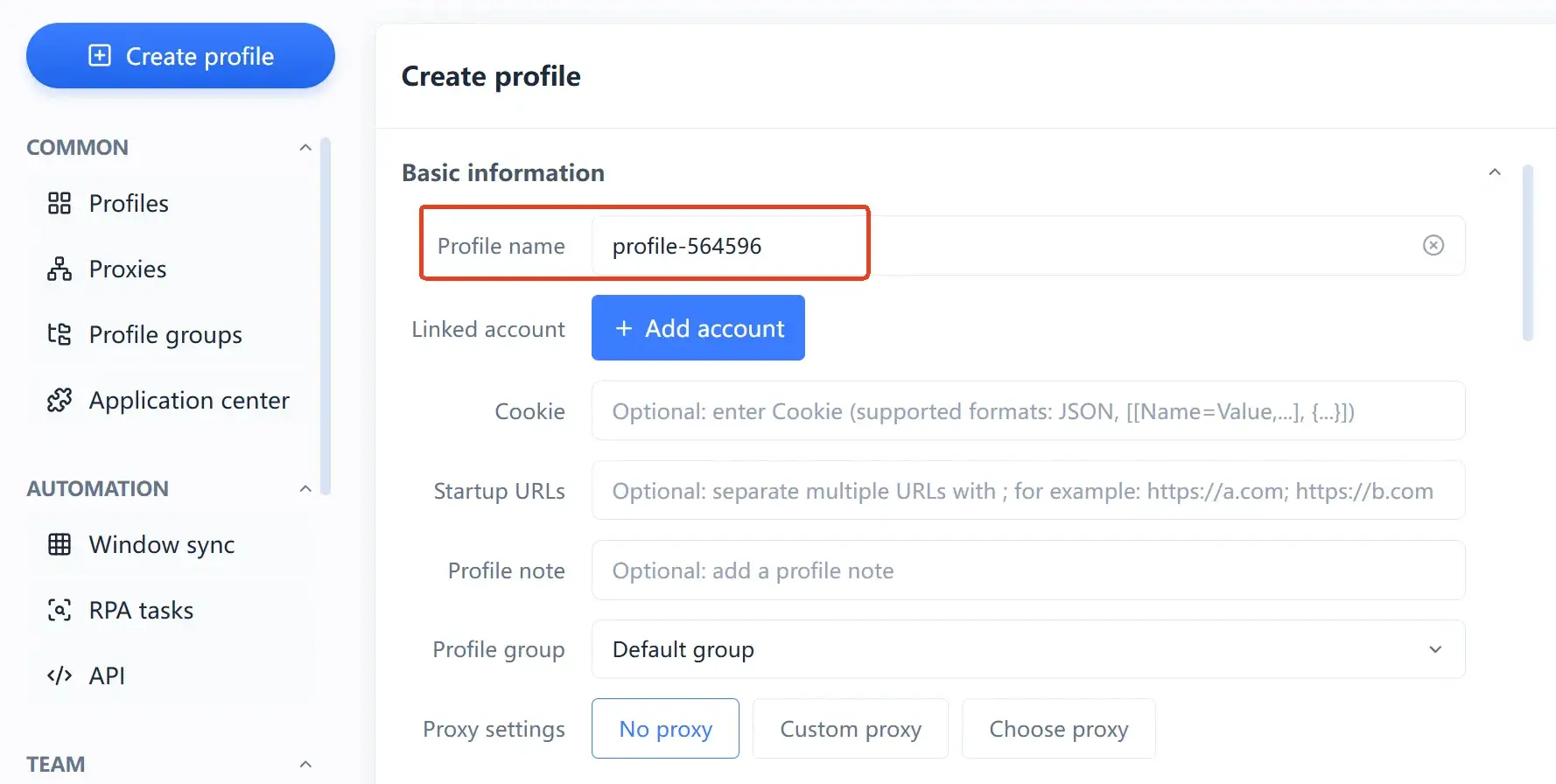
Step 2: bind the proxy and test it. Fill the proxy host, port and credentials into the profile, run the connectivity check to confirm the exit is live, then confirm the IP location matches the store's data.
Step 3: keep the fingerprint at defaults. If you are not sure what to change, do not hand-edit resolution or time zone — the more parameters you touch, the easier it is to create internal contradictions (a Windows user agent with macOS fonts), which look more suspicious, not less.
Step 4: save a template and clone. Once the first store's environment works, save it as a template; new stores clone the template and swap the proxy, and a fresh environment takes minutes. For the batching and data-sync ideas behind this, see how anti-detect browsers turn repetitive work into one-click automation.
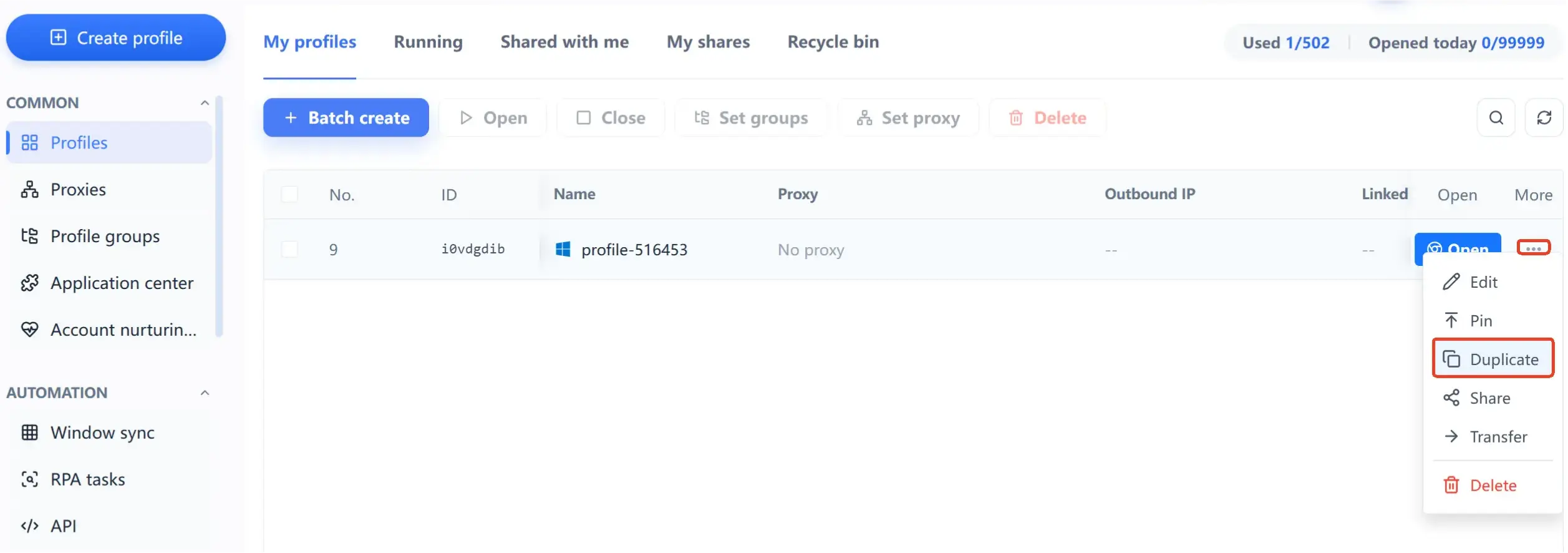
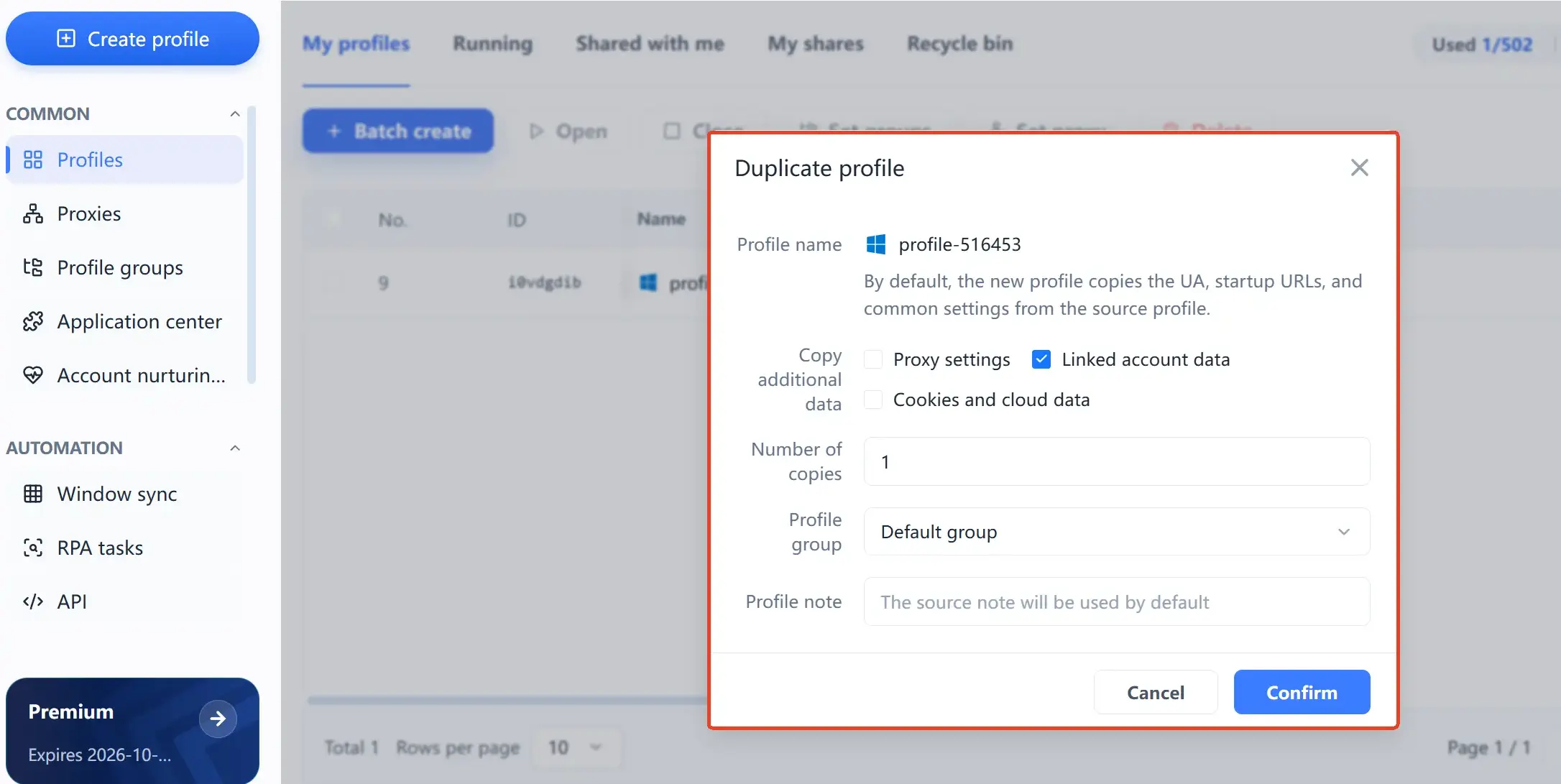
From then on there is only one rule: all operations for a store happen inside its own environment — listing products, changing prices, replying to reviews, checking the dashboard, everything; do not log into that account from your everyday browser.
Six daily rules that keep stores from exposing themselves
Once the environments are isolated, the remaining risk lives entirely in operating habits:
- One store keeps one environment and one proxy; never mix or reuse.
- Each store's email lives in its own environment; never open a store inbox in your personal browser.
- Keep registration data fully separate: email, phone number, payout card, legal entity — not a single overlap.
- In team collaboration, split permissions by store; everyone works only with the environments and proxies assigned to them.
- During ad campaigns or promotions, do not touch fingerprint parameters or switch exit IPs — a sudden environment change is more suspicious than an ordinary one.
- Keep your personal daily accounts out of every store environment.
Platform differences: what Amazon, Shopify and eBay each watch
The isolation framework is universal, but each platform's risk control has its own focus. Amazon is most sensitive to continuity of login environments and account data; the same payout details across several seller accounts is a priority flag. Shopify is a website builder for independent stores, so the risk concentrates on one registration entity repeatedly opening trials or binding the same payment gateway. eBay cares most about login IP stability; frequent cross-region logins trigger verification easily. In practice the difference is only emphasis: on data-heavy platforms secure registration separation first; on login-strict platforms secure exit stability first.

Rolling out multi-store anti-linking with MakoBrowser
If you want per-environment billing and a predictable cost curve, MakoBrowser anti-detect browser is worth comparing directly. It turns each store's isolation into two concrete things: one self-consistent fingerprint profile plus one independent proxy; batch templates and data sync turn "configuring dozens of stores one by one" into a template action, and team collaboration supports store grouping with permission management.
On price (current official list, live page prevails): the free plan includes 2 environments and 2 members, enough to run the whole flow once; Pro is $6.80/month for 10 environments, $40.80 billed yearly, about $0.34 per environment per month; Advanced is $27.50/month for 100 environments, $165 billed yearly, about $0.14 per environment per month, with an extra 30% off on quarterly billing. Past a hundred stores, the fixed per-unit curve stays visibly flat.
The full product mechanics are on the MakoBrowser anti-detect browser landing page; to get started, install the client from the download page and follow "name profiles, bind proxies, save templates, clone in bulk" — you can have your first batch of store environments running within ten minutes.
FAQ
Will opening several e-commerce stores on one computer get them banned?
Not necessarily — it depends on whether signals overlap. One computer with an independent environment and an independent proxy per store gives every store a different device and network identity; the other way round, several stores rotated through the same browser share fingerprint, cookies and IP, and the platform chaining them together is only a matter of time.
Is a residential proxy mandatory, or is a datacenter IP fine?
For multi-store scenarios residential or static residential is strongly recommended. Datacenter IP ranges get flagged as high-risk far more often, and several accounts on the same datacenter range compound each other's suspicion; residential IPs cost more, but they are the only option that makes an "independent network identity" real — saving this money is not worth it.
How is MakoBrowser different from just opening several normal browser windows?
Normal browser windows share the same device fingerprint and storage boundary, so the platform's checks still read one device; MakoBrowser anti-detect browser gives every environment its own fingerprint parameters, cookie storage and proxy channel, plus batch templates and team permissions — the difference between "looking like different devices" and "being different devices".