Facebook Multi-Account Management: Lower Ban Risk with Clean Environments
An account ban usually comes back with just a few words — "violates community standards" — and no clear answer about which step went wrong. On Facebook, penalties need to be split into three separate things, because their causes and their fixes have nothing in common. Environment practices can only improve two of them: accounts judged to belong to the same operator, and suspicious logins treated as account takeover. If the content or the ad genuinely broke the rules, no amount of environment hygiene will hold the line.
First, separate the three things a Facebook ban actually is
- Content and behavior violations: posts, messages, or ads that breach the community standards and the advertising policies. Per Meta's own documentation, penalties range from removing content to reducing distribution to warning the user; repeated violations accumulate points, and only at a certain level do restrictions on features or a full disable follow. Device and IP play no part here.
- Account linkage judgments: the platform decides these accounts belong to one operator, or to a network that coordinates with one another. Meta's account integrity policy states plainly that accounts owned by the same person as a disabled account are handled together.
- Unusual-login freezes: the account broke no rule itself, but its login location, device, or behavior changed suddenly and it's treated as compromised, requiring a security check. This usually isn't a ban, though leaving it unaddressed can escalate.
The last two are where environment practices have any effect at all. To be clear: environment measures only reduce the misjudgments caused by mixed or abruptly changed environments. They don't change platform rules, and they don't promise an account will never be challenged. The official position is laid out in Meta's account integrity policy and the explanation of enforcement actions.
When the platform decides "these accounts are one person," which signals is it reading?
Nothing here is fatal on its own; it's the stacking that forms the link.
- Device and browser identity: browser fingerprint, cookies, and local storage. Log two accounts into the same environment and they now share one identity dataset.
- Network exit: the IP's region, whether it's residential or datacenter, and how many accounts sit on it at once. Datacenter IPs and public proxy pools are a risk multiplier by themselves.
- Login behavior and timeline: whether login times match local waking hours, whether several countries are crossed in a day, whether the rhythm is mechanical. Behaving like a script triggers verification more readily than a slightly untidy environment.
- Identity data: name, avatar quality, linked phone and email, payment method — whether any of these repeat. Meta specifically lists long-dormant empty accounts and accounts with no real interaction history as cases needing extra verification.
- Relationship graph: overlapping friends, mutual likes, appearing in the same set of groups. A few accounts cheerleading for each other adds to the risk score.
Put all five together and it's obvious why swapping the IP alone does nothing: you've changed one signal and left four still exposed.
Environment practice one: bind one Facebook account to one fixed environment
Isolation requires a tool that can give each account its own environment, and that is what an antidetect browser is for.
There's only one main line: one account to one environment, unchanged over the long term. It comes down to three things.
-
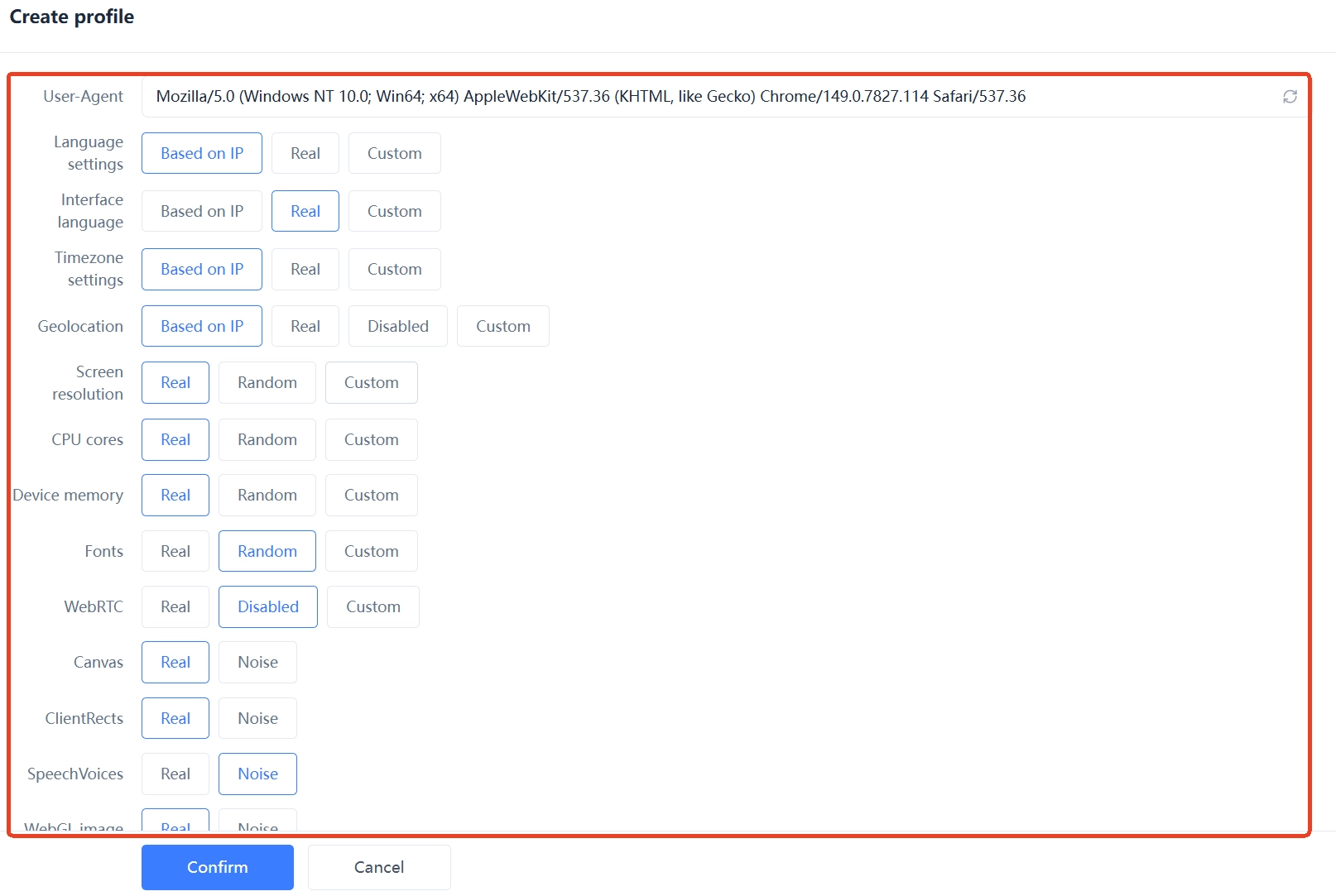
Fix the fingerprint: the time zone, language, resolution, and User-Agent set at creation shouldn't be touched again. Swapping the whole fingerprint three months in is more suspicious than having started with a different one.
-
Fix the exit: one account keeps using the same block of IPs in the same region, preferably over a residential or static proxy. Changing country every day doesn't read as changing networks — it reads as a stolen account.
-
Fix the login entry point: always through the same client environment, never here today and somewhere else tomorrow. If mobile and desktop are both used, at least keep the network region consistent.
Why does stability matter more than parameter complexity? The pattern set by the first few dozen logins becomes the platform's baseline; any sudden departure gets examined on its own.
There's also a detail that's easy to miss: when staff hand over, change the operator, not the environment. Hand an account to a colleague and the environment and exit stay exactly as they were — only administrative access moves. Otherwise it's as if the account suddenly jumped to a new device.
Environment practice two: during warming, behavior rhythm matters more than environment parameters
Once the environment is stable, the other half of the problem is behavior.
Warming isn't "fooling the system" — it's letting an account be used at a real person's pace. A new account with a blank profile and no interaction history is already under observation; aggressive behavior on top of that just stacks two suspicious signals together.
A rhythm you can follow:
- Days 1 to 3: fill in the profile — a real avatar, a full name, and education and work details where you can. Browse only; no friend requests, no posts.
- Days 4 to 7: like and comment on a few real pieces of content each day, add one or two people you actually know, and keep daily friend requests in the single digits.
- Weeks 2 to 4: gradually raise posting and interaction frequency, and start joining relevant groups. Don't post the same link to more than three groups within an hour — that's easily read as spam.
- After a month: only then consider commercial use, such as attaching the account to a Page or running ads. Ad accounts are especially sensitive to environment continuity, so don't switch them on at the same time as a brand-new account.
By contrast, here's what to avoid in the first month: posting ads on registration day, sending bulk friend requests within a short window, copying one block of text into several groups, and running scripted automation with fixed frequencies. These touch limits the policies state outright, regardless of how clean your environment is.
One more caution: old accounts of unknown origin and bulk-registered accounts aren't worth buying. Meta treats "accounts created or repurposed to evade a previous ban" as a direct enforcement target, and such accounts carry a linkage marker from birth that no environment can wash off.
Five moves that make an account expose itself
- Rotating several accounts through one environment: cookies, fingerprint, and IP are all shared, which ties the accounts together — one goes down and the rest go with it.
- An IP that jumps across countries in a day: switching nodes constantly, especially a global VPN hopping between countries, looks no different from a stolen-account login to risk control.
- Several accounts sharing one phone number, email, or payment method: duplication at the data layer is the hardest linkage evidence to explain, so confirm each account uses distinct credentials before binding anything.
- Several people sharing one account login: the same account leaving login records across different devices and regions triggers a security-risk judgment directly. Team collaboration should hand out separate environments and permissions.
- Cloning an existing environment to open accounts in bulk: cloned environments share the same fingerprint and fonts — it looks like several environments, but the fingerprints are near-identical, which is itself an obvious bulk signature.
Putting it into practice by scenario: multi-store, matrix, and agencies
-
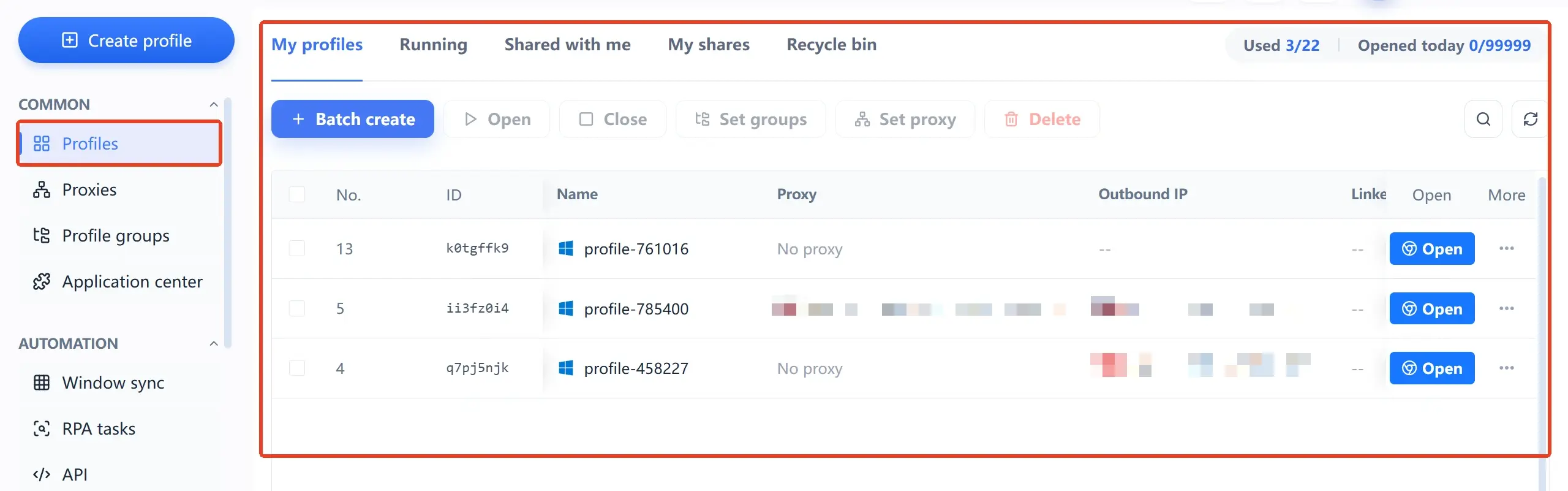
Cross-border e-commerce with multiple stores: the store Page, the ad account, and the personal account are linked, so one environment should map to one complete business identity — don't mix different stores into the same environment. Ad accounts are especially afraid of environment changes, so don't adjust the fingerprint or swap the exit while campaigns are running.
-
Social media matrices and MCNs: the volume is high, so grouping and permissions come first. Split environments by platform and by operator, and let each person see only their own share.
-
Agencies managing client assets: the environment ownership of a client account must be explicit — hand over the environment along with the account rather than copying the password into a new environment you created yourself. Assign permissions by role and reclaim them promptly when someone leaves.
If these environments need centralized management, look at how MakoBrowser turns environments into assignable assets: group them by business line, configure a proxy once and reuse it long-term, assign permissions by member role, and hand repeated operations to RPA templates. To walk one account through the full flow first, install the client from the download page, available for both Windows and macOS.
Frequently asked questions
Does Facebook allow one person to run multiple accounts?
No. Meta requires one account per person, and holding multiple personal accounts violates the community standards; a personal profile also can't be used for commercial purposes. The legitimate multi-account scenarios are usually agencies, team collaboration, or multi-brand operations — provided the platform's rules on account use are followed.
If I use an antidetect browser, will my account never be banned?
You can't put it that way. Environment isolation reduces the misjudgments and unusual-login checks triggered by mixed environments or sudden device and network changes; it can't do anything about content violations or ad violations. Whether an account is safe ultimately depends on whether you follow the community standards and the advertising policies.
What happens if I log two Facebook accounts into one environment?
The two accounts share the same cookies, fingerprint, and exit IP, which effectively files them under one operator; if one runs into trouble, the odds that the other is handled along with it rise sharply. One account per environment is the most basic bottom line.
How should I act in the first few days of a new account to look natural?
Focus on completing the profile and browsing, and hold off on friend requests and posts. From day 4, do a little real interaction each day, keep friend requests in the single digits, raise the frequency gradually after week 2, and only consider commercial use after a month.
After an account is banned, can I register a new one in a fresh environment?
Not advisable. Meta explicitly targets "accounts created or repurposed to evade a previous ban," and a new account is easily judged to belong to the same owner as the old one — often the result is that both are handled together. The correct order is to go through the official appeal first, and only consider a compliant new approach once recovery is confirmed impossible.