Isolated Facebook Ad Account Environments 2026
Isolated Facebook Ad Account Environments 2026
New advertisers often ask: I only run two Facebook ad accounts for different product lines, so why do they still get banned? The problem is rarely the number of accounts. It is that the two accounts look like the same person — shared browser, shared IP, shared payment card, shared Business Manager access, even a shared device fingerprint. Risk engines connect them instantly. This guide follows a clear order: why accounts get linked, what to isolate, how to build it, and how to run it long term.
Why a shared environment gets your accounts linked
Ad platforms (Meta, Google, TikTok and others) do not ban specific actions. They use clustering algorithms to find similarities between accounts. Three signal groups usually trigger a link at the same time:
- Identical device and browser fingerprints: Canvas rendering, WebGL, font lists, timezone, language, screen resolution, CPU cores, memory and battery data are nearly identical when you open several plain browser windows. The system links them to one device at zero cost.
- Overlapping network signals: The same IP, the same C-subnet, the same exit ASN read as one group. Wi-Fi fingerprints, IPv6 and DNS caches are collected too.
- Repeated money and identity trails: The same credit card, the same company entity, the same payout account, the same Business Manager, the same business license submitted repeatedly. These non-technical signals carry the highest weight when platforms decide accounts are linked.
What an isolated environment actually isolates
The core idea is to make each ad account's digital identity a non-overlapping set. At minimum, isolate across three dimensions. MakoBrowser turns the first layer into a core capability: one Profile is one digital identity, and multiple Profiles are isolated from each other by default.
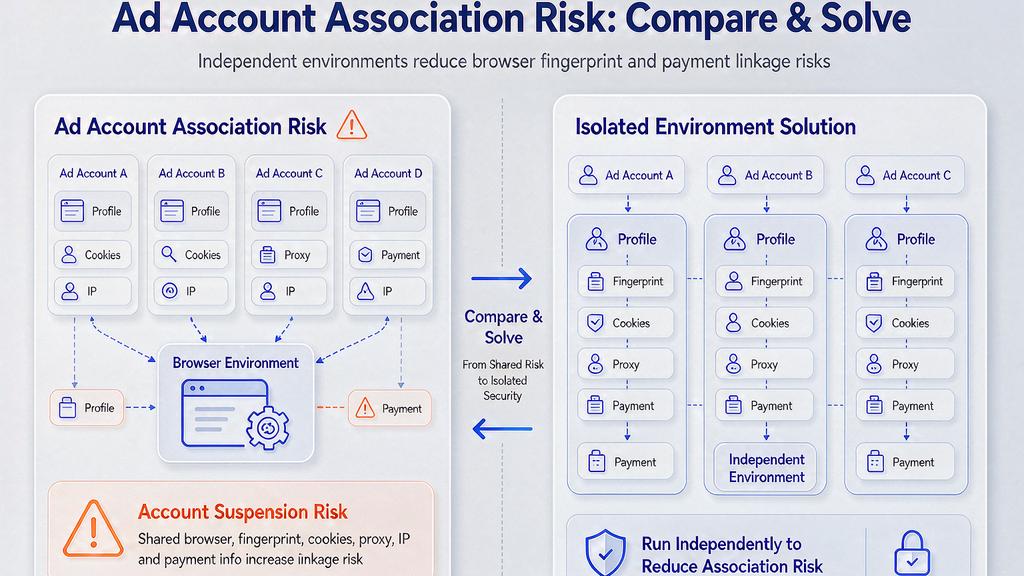
- Device and browser dimension: Each account maps to one independent Profile (also called a browser environment) with its own Canvas, WebGL, fonts, timezone, language, UA and screen parameters.
- Network dimension: Bind one independent proxy per Profile. Residential or mobile proxies are preferred over shared datacenter IPs. Cover the real geo of each target market, and never assign two accounts IPs from the same C-subnet.
- Money and identity dimension: Give each ad account its own payment card, its own Business Manager entity, its own email and phone, and its own company or sole-proprietor entity. This is the highest-weight link factor and the hardest to fix later.
Build a working isolated ad-account workflow from scratch

Turn the idea into steps with a simple five-step flow:
Step 1 — Clarify business boundaries. Decide how many accounts you will run, what business line each serves (different category, market or price point), and whether they share a Business Manager. Clearer boundaries mean simpler relationships and lower link risk. Step 2 — Choose a fingerprint browser and create Profiles. One Profile per account with independent fingerprint parameters. Do not leave every Profile on the same defaults, or clustering will catch them. MakoBrowser adds batch Profile creation, fingerprint variation and one-click proxy binding so you avoid stitching scripts together. Step 3 — Bind an independent proxy to each Profile. Vary geo, IP type (residential, mobile, datacenter) and ASN. When testing, open an IP-info site to confirm the exit matches your plan. Step 4 — Log in to the ad console and bind payment. Independent email, Business Manager, payment card and domain (if you run a store) per account. This is the highest-weight link factor, so make it real. Step 5 — Run a warm-up period. Do not pour big budgets in on day one. Run a few small test ads so the system reads the account as normal use. Warm-up usually lasts one to two weeks, depending on platform policy.
To compare which tool fits across fingerprint depth, environment management, proxy support, stability, teamwork and price, see the fingerprint browser buying guide. If you are moving from Chrome or Edge multi-window setups, the regular browser vs anti-detect browser article explains the difference between the two tool types and helps you decide when to upgrade. The Instagram marketing matrix article covers the same logic for Instagram matrices.
Keep the isolated environment running: teamwork and policy tracking
An isolated environment is not built once and forgotten. To keep it running long term, do at least three things:
- Role-based permissions and audit trails. In team operations, ops, buyers, designers and finance should map to different permissions: who can touch the Business Manager, who can change payments, who can see data. Reclaim access the moment someone leaves. MakoBrowser Team edition ships permission tiers, login logs and audit trails as standard — single-machine editions cannot reach that granularity.
- Environment health checks. Every week, sample one or two Profiles: is the fingerprint still stable, is the proxy still alive, are cookies expired, is the payment card declined? Any weak link drags the whole account down.
- Policy tracking. Meta, Google and TikTok all keep tightening risk controls. A play that was compliant last year may trigger a review this year. Spend an hour or two each month on official policy updates, compliance blogs and community notices — far cheaper than firefighting later.
If you are migrating from another fingerprint browser, the migration steps and data export (Profiles, cookies, proxy config) are covered in the fingerprint browser migration guide.
Frequently asked questions
Do I absolutely need a fingerprint browser for multiple ad accounts? Not always. Two accounts with clear boundaries, no shared payments and no shared Business Manager can survive on Chrome multi-profile for a while. But once you reach three or more accounts, or cross-market and cross-category teamwork, the work and risk of bare windows rise exponentially. Is an isolated environment illegal? Reasonable, compliant multi-account operation is not illegal. A team managing several ad accounts is common in advertising, as long as each account maps to a real business, a real payment entity and a real market position. What is illegal is not the accounts, but using them for grey-market operations that violate platform policy. Is MakoBrowser's free tier enough to test multiple ad accounts? Yes. The free tier is enough to fully walk the validation flow — create Profiles, bind proxies, log into the ad console and warm up. Move to a paid tier only when you scale to real business, and the latest download is at the end of this article. How do I scale when the team grows? The single-machine edition fits a 1–3 person team. Beyond three people, upgrade to Team edition where permission tiers, audit trails and centralized management become necessary. As account count keeps growing, design the mapping of people, business lines and markets.
If you are about to build an isolated environment for multiple ad accounts, start with MakoBrowser free tier and get a minimum viable system running — create two Profiles, bind two proxies, log into two ad accounts, and feel the difference between an isolated environment and bare windows. Whether the tool fits is something you learn only by running it.