How to Choose a Fingerprint Browser in 2026: A Buying Guide from Free to Paid Plans
The most common mistake when buying a fingerprint browser is shopping from a feature checklist and a price table — the more features the better, the cheaper the better. Run it for a while and you'll discover that what the checklist doesn't show (whether it stays stable, whether profiles silently break, whether team handoffs feel smooth) is what actually decides whether you renew. A recent overseas review compared multiple anti-detect browsers for 2026, and its core point matches what we've seen building MakoBrowser and running accounts alongside thousands of users: choose a tool that fits your workflow, not one that wins on spec sheets. This guide breaks "how to buy" into steps you can actually follow, with a clear path for your scenario and budget.
Define your scenario first, then talk tools
The same "fingerprint browser" gets bought for completely different reasons. Find your row first:
- Individual, small scale (a handful of accounts): the core need is clean profile isolation and a quick start — a free plan or an entry-level paid plan is usually enough;
- Small to mid-size teams (ten to a few dozen profiles): you need bulk management, permission assignment, and a smooth way to hand profiles between members;
- Studios / heavy matrix operations (a hundred or more profiles): stability, automation APIs, and the cost curve dominate. At that scale, the slightest instability becomes an incident.
Don't spend money before the scenario is clear. Many tools split their paid tiers by profile count and seat count, so your size directly determines which tier you land on — and which tier is actually the best deal.
Six dimensions, one by one
Some reviews break selection into a clear order of dimensions. Based on our years building MakoBrowser, here's how we'd weight them. This list is literally the standard we use to polish our own product — use it to compare any vendor, including us:
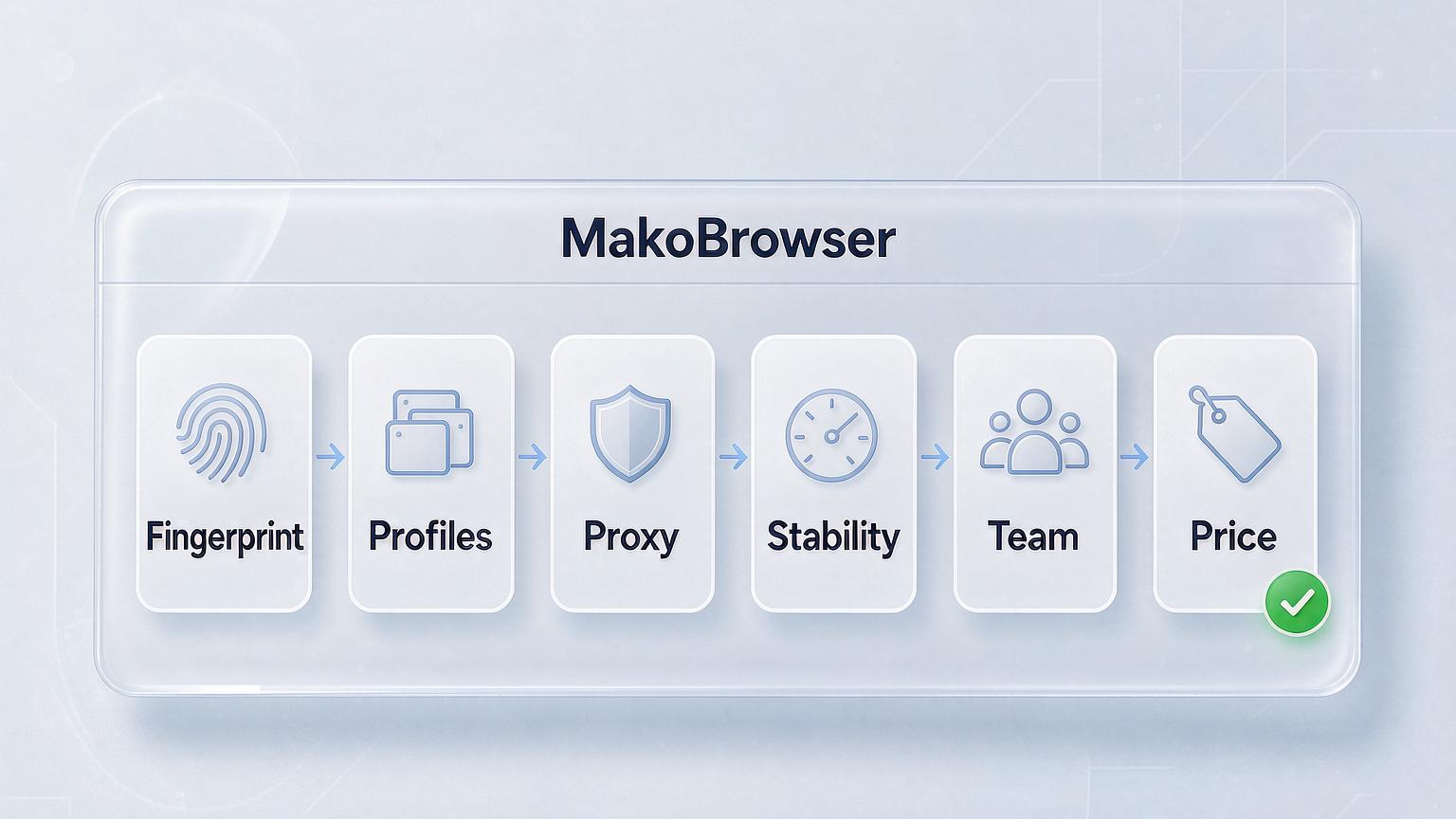
- Fingerprint depth: can you customize Canvas, WebGL, fonts, timezone, and other core parameters, and do those parameters drift across versions? This is the passing grade — fail it and the tool is out.
- Profile management: bulk creation, groups, tags, profile cloning. Once profiles pile up, these features decide how much of your day goes into clicking.
- Proxy support: it should handle every protocol, and fingerprint parameters should auto-align with the IP's geolocation. For how to verify that consistency, the TikTok profile setup guide has a checklist you can use directly in your evaluation.
- Stability: profiles survive long sessions without crashing, login states don't vanish, upgrades don't cause surprises. You won't see this on a feature table, but it's the number-one driver of renewals.
- Team collaboration: can profiles be assigned to members by permission, and are operations logged? If several people run accounts together, this is unavoidable — we covered the specifics in team collaboration management.
- Price: not the absolute number, but the per-profile cost at your scale, and whether the free quota lasts long enough to finish your validation.
The first two dimensions decide whether a tool is usable at all; the middle two decide whether it's smooth; the last two decide whether it's worth it.
Can you use the free plan? Yes — but know its limits
Almost every vendor offers a free tier, and reviewers generally suggest validating your workflow on it before paying. But keep the boundaries in mind:
- Profile limits: free tiers usually include only a few profiles — enough to evaluate a tool, not enough to run a business;
- Feature gating: bulk operations, automation APIs, and team permissions are mostly locked behind paid tiers;
- Data risk: profiles you nurture on a free tier may not migrate to another vendor with fingerprints and data fully intact — that's a hidden cost on the books.
Our advice: treat the free plan as a trial period. Use it to run your full workflow — proxy setup, fingerprint checks, daily operations — then pay once everything checks out. Never raise core accounts on a free tier.
Beyond price, stability is the hidden cost
We want to talk about this seriously, because it's the word that shows up most often in both renewal and churn feedback. Over the years many users have migrated to MakoBrowser from other tools, and when we ask why, the answers cluster tightly: not missing features, but profiles that crashed constantly and login states that evaporated — rebuilding an environment costs far more than the subscription you saved. So when evaluating, ask one more question: can this thing stay open all day without you worrying about it?
As the vendor, let's put our cards on the table on both counts. On price: at comparable feature levels, MakoBrowser's pricing is friendlier to multi-profile teams — the official site and the dashboard show every tier's details, and we invite you to compare line by line. On stability: long sessions without crashes, login states that persist, upgrades that don't disrupt your work — those are the top two items on our internal acceptance checklist. However good the marketing sounds, nothing beats testing it yourself — running your full workflow on the free quota is more useful than any review.
Three budgets, three paths
- Almost zero budget: pick a tool with a generous free quota and profile export support, get the workflow running, and keep accounts at experimental scale;
- Individuals / small teams: look at per-profile cost and favor tiers with flexible profile and seat counts. At this scale, put MakoBrowser's pricing on your comparison list — the value stands up to item-by-item math;
- Studio scale: beyond per-profile cost, fold stability, automation APIs, and support responsiveness into the total. A tool that costs a little more but causes fewer incidents is the cheaper option in the end.
Whichever path you take, creating profiles is only the beginning. Day-to-day multi-account management and the underlying anti-association logic (social media account anti-association) are the long-term homework. Bookmark both while you're choosing a tool and you'll save yourself some detours.
FAQ
Will a free fingerprint browser leak my data? Choose a vendor with ongoing maintenance and a verifiable reputation and the risk is manageable; stay away from tools of unknown origin — profile data is account equity.
Which is better value: lifetime license or subscription? Fingerprint browsers iterate fast — kernels and anti-detection logic need constant updates, so subscription is the mainstream model. Tools claiming lifetime deals either update slowly or monetize elsewhere.
Can profiles be migrated when I switch tools? There's no universal standard between vendors, though some tools support export and import. Migrate with cookies included so your account history stays continuous — cookie management explains why cookies are an account's seniority.
Is a more expensive fingerprint browser always better? Not necessarily. The premium often buys team features and service; on pure fingerprint capability the gap between vendors is narrowing. Pay only for the dimensions you'll actually use.
Final word: you're buying peace of mind, not software
There's no standard answer to buying a fingerprint browser — only fit or no fit. Define your scenario, run through the six dimensions, test-drive the free quota, and the answer will surface on its own. Spending the time you save on growing your accounts beats hopping between tools endlessly.
Whichever vendor you end up choosing, we recommend the same sequence: small-scale testing first, then pick a tier and pay, then move your existing accounts — cookies included — into isolated profiles. MakoBrowser's free quota is enough to complete the entire validation process (download here). Scale up once things run smoothly, and both your wallet and your accounts stay safe.