Fingerprint Browser vs. VPN vs. Virtual Machine: How to Isolate Multi-Account Environments
People who ask "should I use a VPN, a virtual machine, or a fingerprint browser for multiple accounts" have usually already tried one of them and found it didn't solve the problem — not because the tool is bad, but because these three things work on completely different layers. A VPN changes the network exit; a virtual machine changes the device and operating system; a fingerprint browser changes the browser identity and account data. Once you know which layer you actually need to isolate, the choice takes less than ten minutes.
First, be clear about what platforms actually look at
When a platform decides "whether these accounts are run by the same person", the signals it reads fall roughly into three layers. Most multi-account mistakes come from handling only one layer while the other two sit exposed and untouched.
- Network layer: the exit IP, its subnet and geographic location, and how many other accounts are already hanging off that IP.
- Device and system layer: operating system and browser version, hardware parameters, system time zone and language, and the set of installed fonts.
- Browser identity layer: the browser fingerprint (rendering parameters such as Canvas, WebGL, and Audio), cookies, local storage, and cache.
These three layers are cross-checked against one another. An IP in Los Angeles, a system time zone set to Beijing time, a language set to Simplified Chinese — none of these is a problem on its own, but together they stand out. So the real question is not "which tool is stronger" but which layer you need to isolate, and whether the other two can align on their own. For a breakdown of what makes up a browser fingerprint, see MDN's Fingerprinting glossary entry.
A VPN changes the network exit, not the account identity
A VPN works in a single, narrow way: it forwards your local traffic through a remote node so websites see the node's IP. All it can do is swap your exit address.
Browser fingerprints are entirely outside what a VPN handles. Resolution, font list, time zone, language, User-Agent, and parameters rendered with hardware and driver involvement such as Canvas and WebGL all stay in your local browser. The same fingerprint paired with an IP that jumps from the US to Germany to Singapore doesn't look like "three different people" to a risk engine — it looks like "one person carrying the same device around the world", which is often more suspicious than doing nothing at all.
There's another easily overlooked point: commercial VPN exit IPs are shared by a large number of users. A single node may carry a thousand strangers' accounts at once, and if any one of them has been actioned, the whole IP range comes under close watch. An IP shared by a large number of accounts becomes a marker in itself.
The scenarios where a VPN fits are clear: reaching restricted content, encrypting traffic on public networks, daily use with a single account. It answers "where you connect from", not "who you are", and environment isolation is simply outside its scope.
A virtual machine isolates the device, but cloned environments often look identical
A virtual machine solves a different layer: it runs a full, independent operating system on one physical machine, and each instance has its own system files, software, and hardware configuration. The device layer really is isolated — a step ahead of a VPN.
The problem lies in the act of "copying". In a multi-account setup nobody installs ten virtual machines from scratch; they build one as a template and clone it. The clones inherit the same system font set, the same browser version, the same default time zone and language, and even the virtual NIC and motherboard identifiers can repeat. To you they are ten machines; to the platform their fingerprints are highly consistent, which actually makes it easier to lump them together.
Opening several browsers in one virtual machine, or creating multiple system users to log into different accounts, works the same way — those are just several windows under one system, sharing a font set, a kernel version, and rendering behavior. The windows are separated; the identities are not.
Cost is just as hard a constraint. Every instance consumes its own CPU, memory, and disk; run a dozen at once and an ordinary office PC will grind to a halt. A virtual machine genuinely fits cases that are few in number and need a completely different operating system — verifying how the same flow behaves under Windows and macOS, for instance. As a daily operating environment for dozens of accounts, its value drops off fast.
A fingerprint browser changes the browser identity — one independent environment per account
A fingerprint browser pushes isolation down to the finest layer: it works not in units of "one person" or "one computer" but in units of one account, giving each account a complete, independent browser environment.
An environment holds three things: cookies, cache, and local storage saved separately; fingerprint parameters configured independently, such as User-Agent, time zone, language, resolution, Canvas, and WebGL; and a separately bound proxy exit. Together, the three keep data from being mixed between accounts and let each account see the same fixed environment every time it opens.
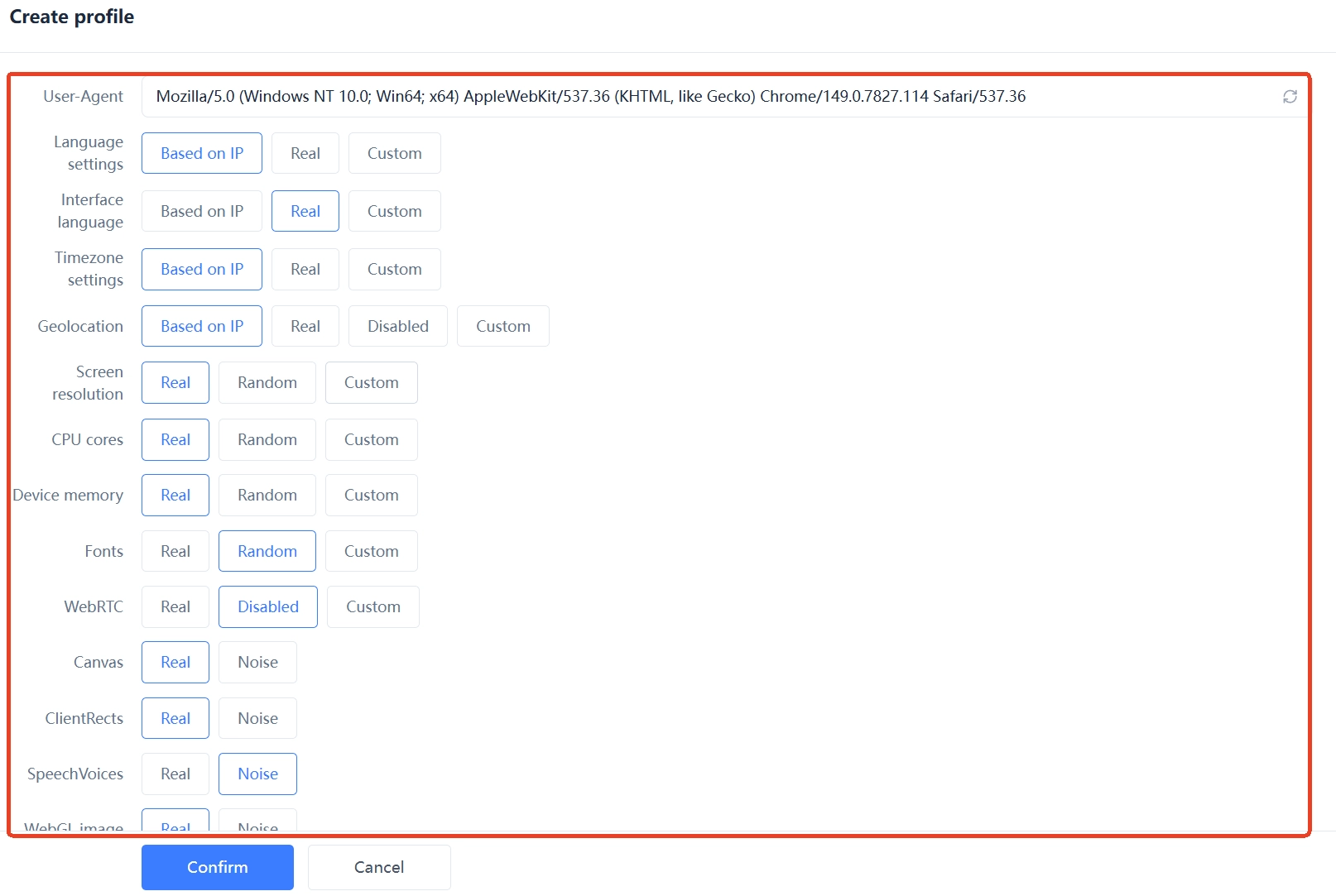
The key is that all three layers must align. If you assign a US proxy to an environment, its time zone and language must follow the US region; if the environment uses English system fonts, don't set the language to Simplified Chinese. If fingerprint parameters, proxy location, and account profile each tell a different story, no amount of environment isolation helps. To see which identifying traits your own browser is currently exposing, run a check with EFF's Cover Your Tracks.
One clarification: the purpose of environment isolation is to keep account data from contaminating each other and to keep each account's environment stable and consistent, which reduces the anomalies that come from mixed environments. It does not promise that an account will never be verified by a platform, nor does it mean platform rules can be ignored.
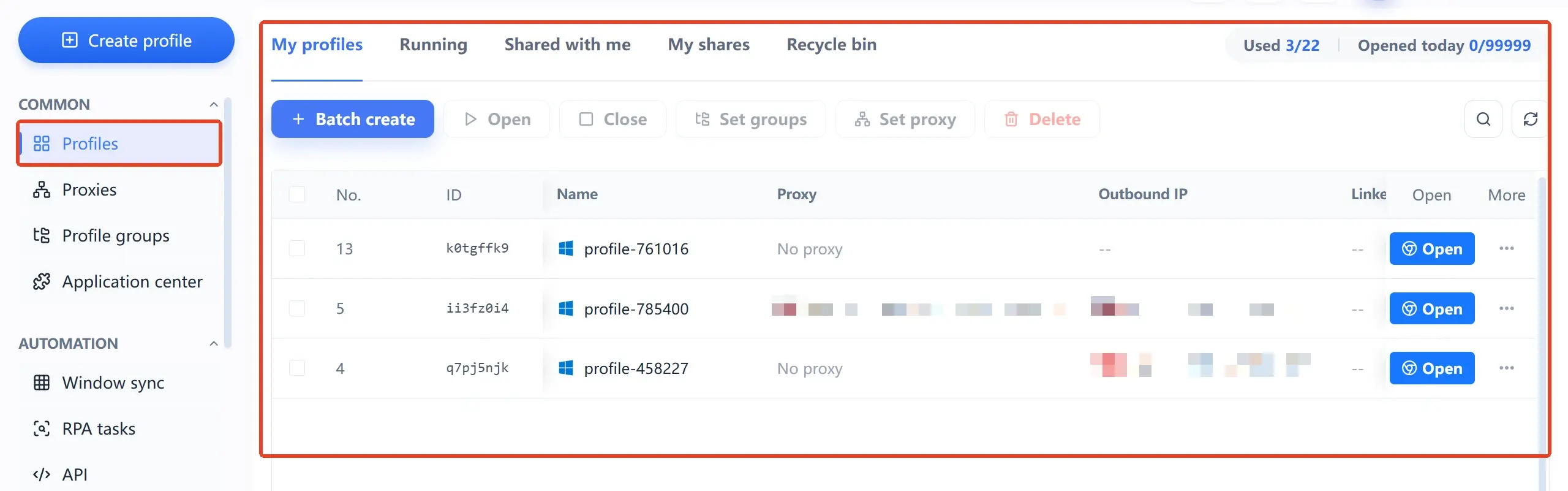
Tools like MakoBrowser turn all of the above into manageable assets: environments grouped by platform or business line, proxies configured once and reused long-term, collaboration with permissions assigned by role, and repetitive operations handed to RPA templates or window sync. As accounts grow from ten to dozens, what actually saves time is this management capability, not "how many windows you can open".
The three most common wrong combinations
With the layers above in mind, the problem with these approaches is obvious — the tool isn't wrong, but only one layer is handled while the other two fight each other.
- A global VPN plus many accounts in one browser: the IP changes country every day, while the fingerprint and cookies stay the same set. The right approach is a fixed exit per account.
- Cloning virtual machines to open accounts at scale: the device layer looks separate, but fonts, kernel, and hardware identifiers are highly consistent, and it still needs differentiated handling of environment fingerprints.
- A fingerprint browser with no proxy per environment: every environment shares the local IP, which is like hanging dozens of accounts on the same cable, with isolation leaking at the last layer.
- Buying proxies without isolating fingerprints: changing the IP doesn't change the identity — it's the VPN logic in a different form, money spent and signals undiminished.
The relationship among the three layers comes down to one sentence: network exits must be separate and stable, device environments must be independent, and browser identities must all differ. Miss any one layer and the other two are discounted no matter how well done.
Choosing by business scenario: who should use what
No tool is better or worse, only a match or a mismatch.
- Reading external content only, single-account daily use: a VPN is enough.
- A few environments needing different operating systems for verification: a virtual machine fits, kept to single digits.
- Cross-border e-commerce with multiple stores: fingerprint browser as the base, one environment per store bound to a fixed residential IP, so stores never share a network.
- Social media account matrices: fingerprint browser plus group management, splitting environments by platform or operator and keeping time zone, language, and network stable over time.
- Multi-account ad campaigns: environments must be stable — avoid frequently changing fingerprint parameters or swapping exits, since ad accounts are especially sensitive to environment continuity.
- Web3 multi-wallet and airdrop tasks: an independent environment plus an independent network per wallet, where the priority is thorough isolation rather than sheer numbers.
If two or more of these apply at once, what you need is no longer just "a different IP" but a full set of environment management capabilities. Take a look at the client on the MakoBrowser download page, available for both Windows and macOS: build a few environments, get the three layers aligned and running, and then decide whether to scale up.
FAQ
Can a fingerprint browser replace a VPN?
They don't manage the same thing. A VPN handles the network exit; a fingerprint browser handles browser identity and account data, so they're normally used together rather than as either/or. Giving each environment its own proxy is usually more controllable than a global VPN, because the exit follows the account.
If I already use a virtual machine, do I still need a fingerprint browser?
It depends on the account count. With three to five accounts that need completely different system environments, a virtual machine is enough. Past a dozen, cloned systems' fingerprints converge and each instance also eats local resources — that's when a fingerprint browser's advantage becomes clear.
If I only change the IP and not the browser fingerprint, will accounts still be linked?
They may be. The IP is only one correlation signal; fingerprints, cookies, and local storage take part in the judgment too. Several accounts sharing the same fingerprint but different IPs still look suspicious to a risk engine.
How many accounts can one fingerprint browser run?
It depends on your proxy resources, computer specs, and platform requirements — there's no universal number. Start with one account, one environment, one fixed exit, and once it runs smoothly, scale by the same standard.
Can a fingerprint browser and a VPN be used together?
Technically yes, but there's no need. A dedicated proxy per environment already controls the exit, and layering a global VPN on top may instead make the exit unstable, or even cause the real IP to mismatch the configuration. Use a VPN when your local traffic needs encryption.