Multi-Store Management: A Practical Guide to Environment Isolation, Dedicated Proxies, and Team Collaboration (2026 Cross-Border Ecommerce)
Multi-Store Management: A Practical Guide to Environment Isolation, Dedicated Proxies, and Team Collaboration (2026 Cross-Border Ecommerce)
Most cross-border sellers hit the same wall: the first store finally turns a profit, you decide to open a second, and the platform quietly links the two accounts together — listings takedown, store banned, funds frozen. The failure rarely comes from product selection or ad spend. It comes from running multiple stores on the same device, the same network cable, and the same set of cookies.
This article treats multi-store management as an engineering problem — how platforms judge accounts as linked, how a fingerprint browser breaks that link, how to configure proxies, how to split team responsibilities, and how to scale. Understanding the principle before touching tools works far better than copying a config checklist.
Let me state who I am up front: MakoBrowser is the anti-detect browser we build ourselves. What follows is an honest write-up of its capabilities and limits, and how to get started — no hype, no downplay. If you want to run a minimum viable setup on the free tier first, there is an entry point at the end.
Why Multi-Store Management Fails: Platforms Compare "Fingerprints"
Every ecommerce seller has heard "the platform checks your IP," but IP is only the most basic signal. When a browser visits Amazon, Shopee, or TikTok Shop, it passively leaks dozens of fingerprint attributes — OS version, screen resolution, font list, Canvas/WebGL rendering output, timezone, installed plugins, hardware concurrency, and more. Even with multiple incognito windows on the same computer, these underlying parameters do not change.
The platform's association-detection system (the industry calls it a "risk engine" or "linkage algorithm") does one thing: it clusters those signals. When two accounts share a fingerprint overlap above a threshold, they get tagged as "likely the same person" — at best throttled, at worst banned together as linked accounts.
Opening a few more browser windows does not solve this. Ten tabs on the same Chrome kernel share nearly identical underlying fingerprints; mixing Chrome, Edge, and Firefox fails too, because cookies, local storage, and login state still leak across them.
There is only one way out: give each store its own independent browser environment — independent fingerprint, independent cookies, independent local storage, independent network exit. Miss any one of those, and the platform can work backward through the gap to conclude "same people behind this."
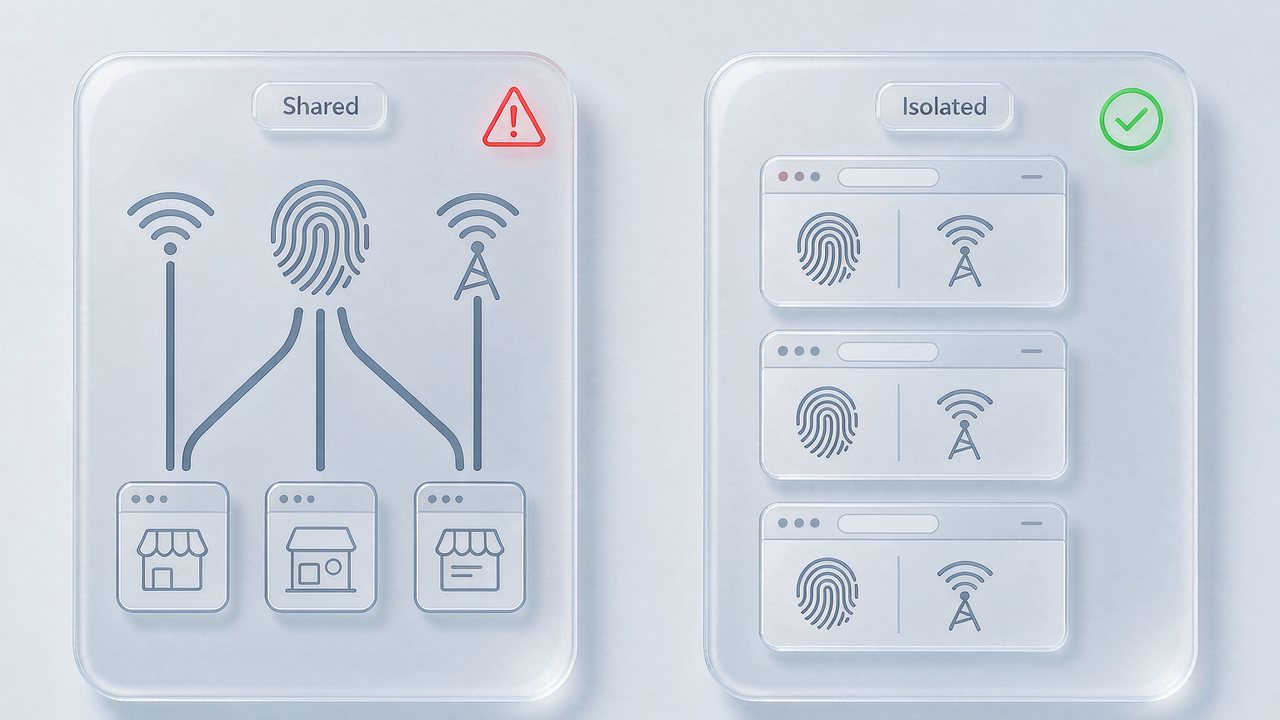
One Store, One Environment: How a Fingerprint Browser Puts Each Store in Its Own Room
A fingerprint browser does four things, and all four are required:
- Profile (environment config): one independent browser config per store — OS, screen, fonts, Canvas/WebGL noise, timezone, language, and dozens of other parameters.
- Fingerprint (fingerprint spoofing): generate or customize a fingerprint inside each Profile so they don't all look identical — the "one template fits all" default is exactly what risk engines love to catch.
- Cookie isolation: each Profile's login state, cart, and local storage are fully separate, with no cross-talk.
- Proxy (proxy binding): bind one dedicated proxy IP to each Profile to simulate "different users from different regions."
All four components working together create the complete story: "this store is a brand-new computer, from another city."
The fastest way to start is to create several Profiles in the fingerprint browser, bind a proxy to each, then log into each store backend one by one. When we built MakoBrowser, we added a few conveniences on top of this flow — bulk Profile creation, one-click proxy binding, and built-in cookie export/import, so you don't have to stitch scripts together. For scoring across six dimensions — fingerprint depth, environment management, proxy support, stability, team collaboration, and price — see the anti-detect browser buying guide.
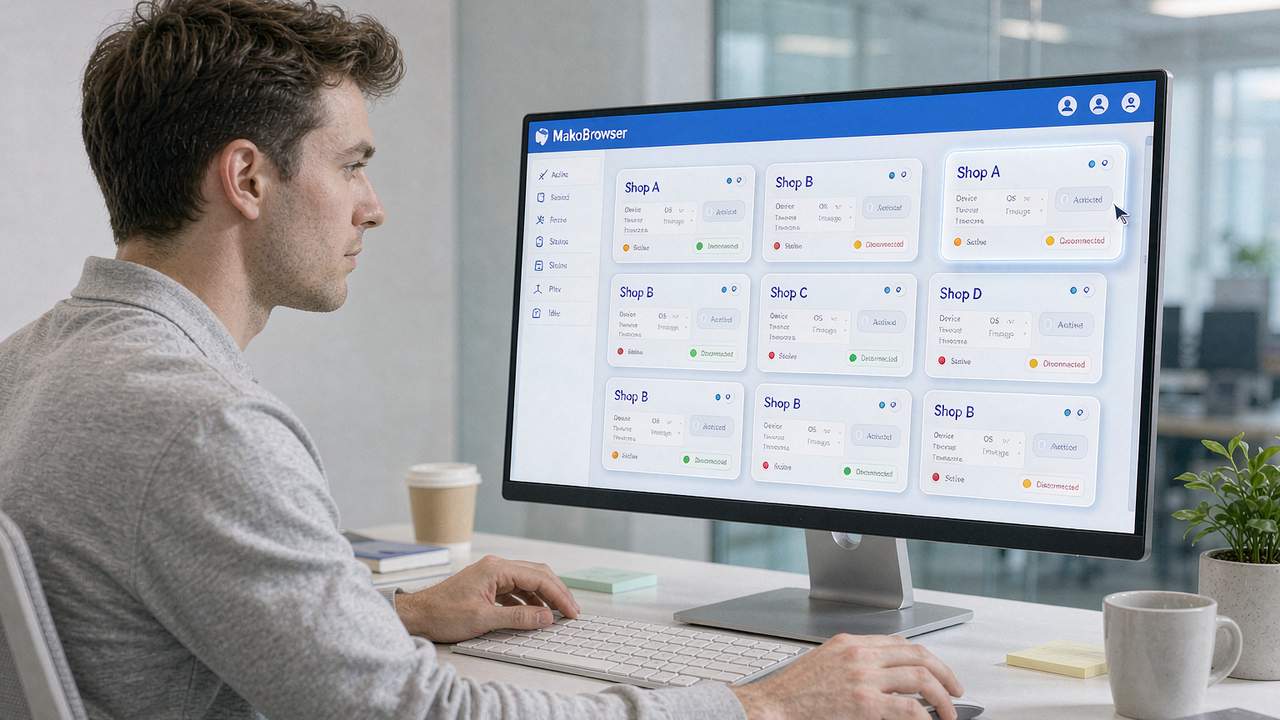
Building a Working Multi-Store Workflow From Zero
When setting this up for the first time, the most common pitfall is arguing over "create the account first or the environment first." The correct order is actually simple:
Step 1: Clarify the business lines. Are several stores the same category (multiple Amazon US stores) or different categories (Amazon + Shopee)? This decides whether fingerprints need regional differentiation, and whether cookies can be reused later.
Step 2: Bulk-create Profiles. Build the matching number of Profiles in the fingerprint browser, configured as a "Store A → Profile A → Proxy A" mapping. First tune the browser fingerprint on the Profile to match the target market (language, timezone, resolution), then bind the proxy. Do not reverse it — bind the proxy first and tune the fingerprint later, and the platform can catch the mismatch between language/timezone and IP location.
Step 3: Log into each store inside the Profile. This must happen inside the Profile. Do not log in with a normal browser first and then import cookies — platforms flag the anomaly of "login IP suddenly differs from daily-use IP," and crossing that red line almost always gets you banned.
Step 4: Run daily operations + weekly review. Listing, customer service, and ad spend work as usual. Spend 30 minutes each week checking each Profile's runtime status, whether the proxy IP has drifted, and whether cookies have expired.
Once those four steps are done, the "minimum viable system" for multi-store management exists. If you want to understand "why a normal browser can't do this," read normal browser vs anti-detect browser — it explains the principle difference clearly.
Team Collaboration and Scaling: Turn Multi-Store Into a Replicable Operating Asset
An individual can manage two or three stores by feel, but the moment a team gets involved — operations, support, design, and media buyers each owning a slice — multi-store management shifts from "personal craft" to "organizational process." Without designing this step well, the bigger the scale, the messier it gets.
In a team setting, three things must be designed in advance:
Permission tiers. Not everyone should see every store's login state. Common approach: the store manager has full access to all stores; operations sees only their own Profiles; support can only reply to customers inside designated Profiles. The permission model in a fingerprint browser is usually called "team / member / role" — the team collaboration guide walks through RBAC (role-based access control) configuration in detail.
Operation trails. Who changed which store setting at what time, and who exported cookies — these operation logs must be traceable. When something breaks, you can quickly locate the weak link, and avoid the "store got messed up but nobody admits it" blame game.
Bulk purchasing of proxy pools and subscriptions. Once you run more than 10 stores, buying proxies one at a time and subscriptions per account stops making sense. Most fingerprint browsers and proxy vendors offer team bulk discounts that bring per-store cost down enough for scale. At scale you can also wire multi-account management into automation workflows — the RPA automation guide covers several patterns from bulk listing to automated support.
The core of scaling is: make the process replicable and the roles replaceable. A new hire is productive in half a day; an exit can be handed off in half a day. That is an asset. Otherwise it is just personal burden.
Making Multi-Store Management a System That Runs Long-Term
The last point, and the easiest to overlook — multi-store management is not "build it once and done." Platform risk rules change every quarter, proxy pool IP quality fluctuates, and fingerprint signature libraries keep upgrading. You cannot run on one config for three years.
A system that runs long-term rests on three pillars:
- Environment rotation rhythm: refresh each Profile's fingerprint every 3-6 months (not frequent rebuilds, but small parameter tweaks) so the platform doesn't "figure out" your fingerprint library.
- Proxy health monitoring: periodically run checks like "is my IP flagged as a datacenter IP" and "is my DNS leaking" — the tooling side leaves a report.
- Policy-change tracking: every platform promo and every rule update moves the linkage algorithm. Watch your stores' "anomaly rate" alongside a "policy update calendar."
Individually none of these three is dramatic, but together they are the difference in "store lifespan." Multi-store systems with this mechanism mostly survive three years later; those relying only on initial setup often start failing en masse within six months.
FAQ
Do I have to use a fingerprint browser for multi-store management? Not strictly, but the association risk of running bare on a normal browser is visible to the naked eye — especially on strict-risk platforms like Amazon and TikTok Shop. A fingerprint browser turns this from "manual" into "engineering," saving time and ban costs.
Is a fingerprint browser illegal? The tool itself is neutral; it depends on the scenario. Self-use of multiple accounts, cross-border multi-store management, and social media marketing matrices are all compliant scenarios. Using it for brushing orders, fraud, or bypassing platform compliance review is a different matter.
Is MakoBrowser's free tier enough to test multi-store? Yes. The free tier is enough to fully run the "build environment — bind proxy — run daily ops" validation flow. Move to a paid tier once you scale to real business.
How do I stop teammates from mis-operating an account in multi-person collaboration? Build the permission model — store manager / operations / support / media buyer by role, with sensitive actions (delete Profile, export cookies) separately authorized, and important stores with a second confirmation.
At this point the full picture of multi-store management is basically laid out — the principle is that platforms compare fingerprints, the solution is one independent environment per store, and the long term relies on environment rotation and proxy health. Tools are only scaffolding; what ultimately decides how far your stores run is your operating rhythm and engineering discipline.
If you are about to open your second store, we suggest using MakoBrowser's free tier to get the minimum viable system running — build two Profiles, bind two proxies, log into two stores, and feel the difference between "independent environment" and "bare windows" for yourself. Run it once and you'll have your answer on whether the tool fits you.