Normal Browser vs Antidetect Browser: How Fingerprint Isolation Really Works
"I use incognito mode and I'm logged into two accounts, so that counts as isolation, right?" — that's the question we've heard most often in our years of account operations. The answer is no, not even close. No matter how many tabs you open or how many times you dip into incognito, a normal browser looks like one and the same device to the platform. We recently came across a hands-on test from an overseas blogger (rough conclusion: the incognito schemes of mainstream privacy browsers can't stop device fingerprinting), and it matches what we see in our own day-to-day troubleshooting. This article breaks down the difference between normal and antidetect browsers so you can decide whether you actually need to switch tools.
A Normal Browser's "Isolation" Is Just a Change of Clothes
Let's be blunt: every "isolation" trick a normal browser offers only touches the surface.
Incognito mode doesn't clear your fingerprint. It merely skips cookies and history, while your Canvas, WebGL, font list, timezone and screen resolution stay exactly the same. Close the window and reopen it — the platform still recognizes you.
The browser's built-in "profiles" are the same story. Chrome's profile switcher looks like isolation, but underneath runs the same engine, the same hardware parameters and the same exit IP. Requests from both "identities" come from one machine as far as the risk-control system is concerned.
Multiple windows goes without saying — that's just the same environment copied a few times.
There's another trap worth flagging: platforms' official "multi-account allowances" make people drop their guard. TikTok's official line, for instance, is that a single email can hold up to 6 accounts, but real risk control works at the device level — frequent log-ins and log-outs on the same phone or computer can trigger verification even within the quota. Official limits and risk-control logic are two different rulebooks; don't mix them up.
How Platforms Weave Your Accounts into One Web
When a platform decides "these accounts belong to the same person," it doesn't rely on login records — it stacks three layers of signals:
- IP layer: multiple accounts behind one exit IP are the most direct linking signal.
- Device fingerprint layer: Canvas fingerprint, WebGL rendering traits, fonts, timezone, language, hardware concurrency… combined, these form the device's "ID card." Changing accounts without changing fingerprints is changing masks without changing faces.
- Behavior and data layer: activity hours and rhythm, plus the fact that cookies are an account's reputation — once the same cookie identity shows up across accounts, the link is all but confirmed.
The more layers match, the more confident risk control becomes, and what follows is CAPTCHA storms, throttling, or outright bans. We've broken down the full logic of this linking in our article on anti-association for social media accounts; the two pieces read well together.
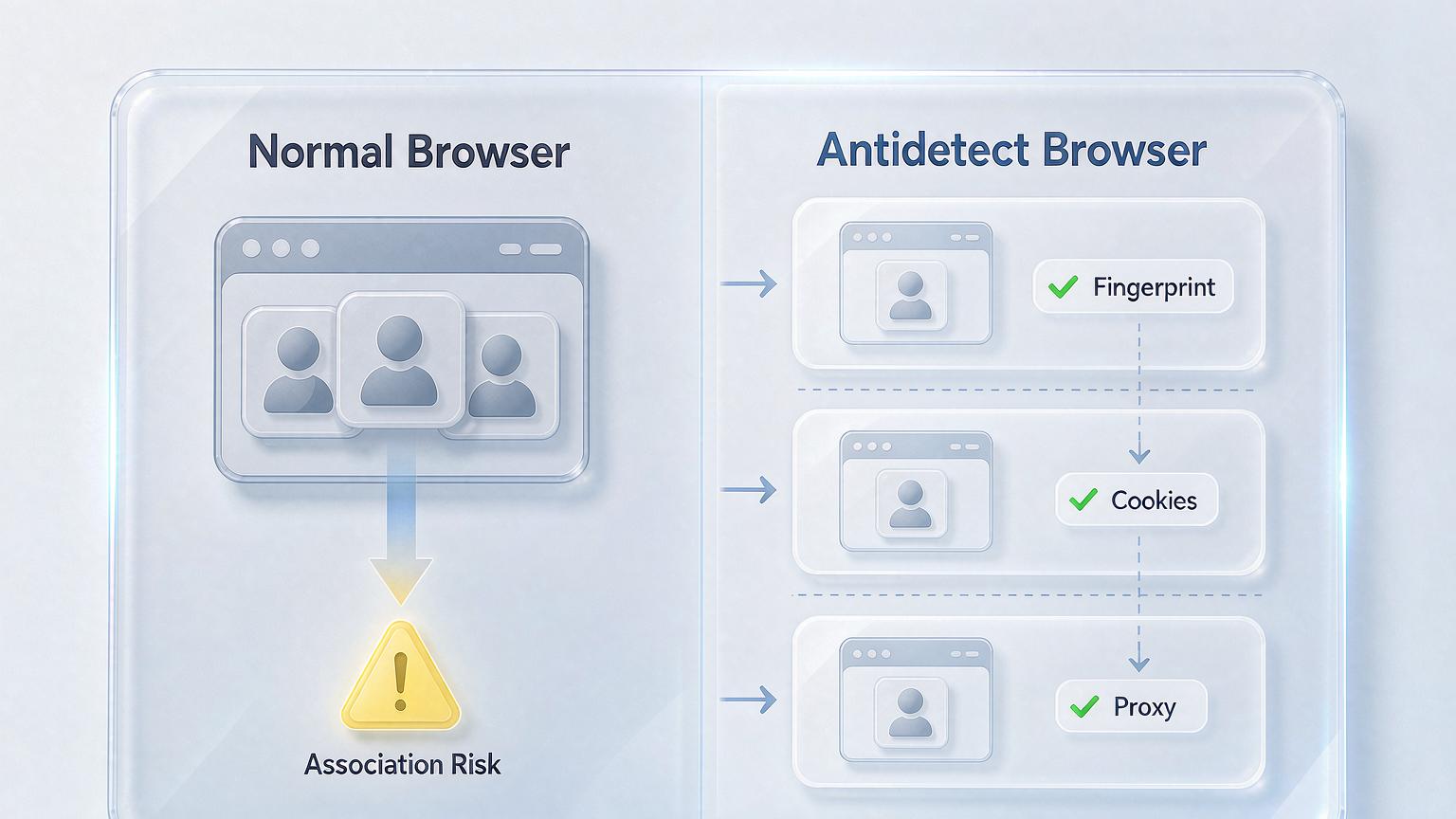
What an Antidetect Browser Changes
A normal browser's philosophy is "one browser for everything"; an antidetect browser's philosophy is "one account, one environment." The difference boils down to one word: independence.
- Independent fingerprints: each profile gets its own set of device parameters — Canvas, WebGL, fonts, timezone and resolution are all configurable, so environments never cross wires.
- Independent data: cookies, localStorage and login states are stored separately; environment A's login traces never appear in environment B.
- Independent networking: each profile runs its own proxy, with IP geolocation aligned to timezone and language, so the whole chain looks like a genuine local user. For a ready-made, item-by-item checklist of how to configure this consistency, see our TikTok environment setup guide.
Take the MakoBrowser fingerprint browser that our own team uses: creating a new environment generates a new fingerprint plus an isolated data directory, and switching environments is effectively switching to a different "device" — something a normal browser's multi-profile feature simply can't give you.

Who Should Switch — and Who Really Doesn't Need To
After all that: not everyone needs to switch tools. The test comes down to one question: do your multiple identities need to be treated as different people?
We recommend switching if you are:
- A social media agency: running several clients' accounts at once, where one account's fall can drag down the rest — nobody can afford that. For a complete rollout plan, see our article on multi-account management.
- In cross-border e-commerce: most marketplaces explicitly ban one person running multiple stores, so environment isolation is a hard requirement.
- Running ads: ad accounts face stricter linkage reviews than social media; the bigger your matrix, the earlier you should isolate.
You don't need to switch if: you simply want to separate work and personal life, or run two ordinary accounts for yourself — the browser's built-in user switching is perfectly sufficient, and installing an antidetect browser would be overkill.
FAQ
Does incognito mode plus an IP change work? Still not enough. The IP changes but the fingerprint doesn't — "the same device switched networks" is itself a suspicious signal. Fingerprints and IPs have to change together.
How many environments can one computer safely run? It depends on proxy quality and how you operate, not on the number of environments. Rule of thumb: treat every environment as a real person — vary the cadence and the content.
Can an antidetect browser guarantee accounts won't be banned? No, and anyone who promises that is bluffing. It solves detection at the environment level; content quality and platform rules still carry most of the weight.
Are free antidetect browsers usable? They exist, but environment counts, fingerprint depth and team features are usually limited. For serious business use, go with a maintained commercial product so someone has your back when things break.
Final Words: Isolate the Environment, Protect the Accounts
Back to first principles: the difference between a normal and an antidetect browser isn't feature count, it's design goal — the former serves "one person browsing the web," the latter serves "multiple personas each standing on their own." Once your multi-account operation reaches a certain scale, environment isolation stops being a bonus and becomes the passing grade.
In our own order of operations: first map out your account scale and how strict each platform's risk control is, then set up independent fingerprint environments with clean proxies, and finally vary the way each environment is operated. On the tooling side, MakoBrowser's environment management, proxy configuration and team permissions are ready out of the box (download here) — you can move your existing accounts into isolated environments the same day you install it. And when you migrate, bring the cookies along so an account's reputation doesn't break midway.